
Workiz is field service management software built for fast-moving, call-heavy service businesses. We tested 95 individual elements across onboarding, CRM, scheduling, dispatch, estimates, invoicing, payments, communication, reporting, mobile use, pricing, and support.
Workiz
Trade Categories
Software Categories
Affiliate disclosure: Some links on this page are affiliate links. We earn a commission at no cost to you. This never influences our rankings. Read our methodology.
Quick Verdict
Workiz is built for high-velocity, on-demand trades. Its built-in phone system, fast dispatch workflow, and dedicated card-surcharge feature make it stand out for locksmiths, junk removal companies, and call-heavy HVAC shops, but premium pricing and uneven support keep it from being the best all-around choice.
What We Like
- Built-in Workiz Phone system is a core operational differentiator.
- Fast, dispatch-focused workflow suits high-volume, on-demand trades.
- Dedicated card-surcharge feature can itemize service fees on invoices.
- Strong price-book organization with nested categories and item groups.
- Invoice template designer offers five themes and detailed layout controls.
- Automatic invoicing is available directly from the invoice action menu.
What Could Improve
- Forty-two role permissions can overwhelm smaller teams.
- Estimates are job-anchored, adding friction for estimate-first businesses.
- No named-property model for complex multi-site customer accounts.
- Mobile stability and offline support receive inconsistent feedback.
- Schedule conflicts are visually separated rather than clearly blocked.
- Pricing is high for small teams that do not need phone-first dispatch.
How We Tested Workiz
We evaluated Workiz using the same TradeGarden rubric applied to every field service platform — 95 scored elements across scheduling, CRM, invoicing, mobile, and support, tested hands-on in live accounts rather than from marketing materials.
Each item was scored through our hands-on pass and cross-checked against an independent AI-assisted pass, with manual audits wherever the two diverged. Read our full methodology.
Last tested: July 18, 2026
Pricing
Standard
The top tools to grow your company faster, save time and increase revenue
$275/month
Monthly payment, annual commitment
1-5 users
Each extra user costs $55
- Everything in Lite, plus:
- QuickBooks Online
- Custom fields
- Automated reminders
- Online booking
Best Value!
Pro
The perfect plan with AI tools and enhanced automations.
$325/month
Monthly payment, annual commitment
1-5 users
Each extra user costs $65
- Everything in Standard, plus:
- AI-powered tools
- Enhanced automations
- Advanced reporting
Ultimate
The complete plan for HVAC, Plumbing, Garage door, Junk Removal, & more.
Contact Workiz
1-5 users
- Everything in Pro, plus:
- Multi-location support
- Advanced permissions
- Dedicated onboarding
Pricing verified July 2026. Workiz updates pricing periodically.
Who Should Use This Software?
Great For
- On-demand, inbound-heavy trades such as locksmiths, junk removal, and emergency HVAC.
- Businesses that book primarily by phone and need rapid call-to-dispatch speed.
- Shops that want card surcharges built into customer invoices.
- Teams needing flexible price-book organization with kits and bundles.
Consider Alternatives If…
- Choose Jobber when client-facing polish and mobile stability matter most.
- Choose Housecall Pro when marketing automation and value across user counts matter more.
- Compare enterprise platforms when multi-jurisdiction fleet and job-cost reporting are essential.
Not Ideal For
- Businesses that primarily create standalone estimates before jobs.
- Small companies seeking a simple, inexpensive permissions model.
- Teams prioritizing the cleanest client-facing portal and mobile stability.
- Businesses needing multi-site commercial property management per customer.
FAQs
How much does Workiz actually cost per month?
Workiz's paid plans start at $275/month for Standard and $325/month for Pro, with an Ultimate tier at custom pricing. However, the real monthly cost runs higher once you factor in $30 per additional user beyond the plan's included seats, plus the optional Workiz Phone add-on for VoIP and call tracking. A 17% discount is available if you commit to annual billing. There is also a free Lite plan capped at 20 jobs, invoices, and estimates per month for up to 2 users — useful for testing but too limited for most active businesses. Payment processing runs 2.9% + $0.30 per card transaction.
How does Workiz compare to Jobber and Housecall Pro?
Workiz stands out for call-heavy, on-demand trades thanks to its built-in VoIP phone system, which neither Jobber nor Housecall Pro offers natively. It also has the deepest pricebook of the three (nested categories, item groups, and kit bundling) and is the only one with a dedicated card surcharging feature built into invoices. Jobber wins on overall ease of use, client-facing experience, and commercial property management — it scored highest in our testing for UI clarity and onboarding. Housecall Pro leads on marketing automation, built-in review management, and consumer financing options (Wisetack plus Klarna). Workiz's main trade-off is a higher entry price ($275/mo vs. Jobber's $49/mo and Housecall Pro's $59/mo) and a shorter 7-day trial compared to the others' 14-day trials.
Does Workiz offer a free plan or free trial?
Yes to both. Workiz has a free Lite plan that includes scheduling, invoicing, and online payments for up to 2 users and 20 jobs per month — no credit card required. For testing paid features, Workiz offers a 7-day free trial, which is shorter than Jobber's and Housecall Pro's 14-day trials. The shorter window means you'll want to have test data ready before signing up so you can evaluate thoroughly within the week.
Does Workiz integrate with QuickBooks?
Yes, Workiz integrates with both QuickBooks Online and QuickBooks Desktop. However, in our testing we found two friction points worth knowing: the integration is accessed through Workiz's "Feature Center" rather than a standard settings menu, which adds an extra step to find and enable it, and it's only available on the Standard plan ($275/mo) and above — not on the free Lite plan. Once configured, it syncs invoices, payments, and client details from Workiz to QuickBooks. Multiple independent sources note the integration is functional but less robust than Jobber's or Housecall Pro's QuickBooks sync for advanced accounting workflows.
What types of businesses is Workiz best for?
Workiz is built for on-demand, inbound-heavy service trades where the phone rings constantly — locksmiths, junk removal companies, emergency HVAC, and appliance repair. The built-in VoIP phone system with call recording, automatic caller identification, and call-to-dispatch speed is what sets it apart for these businesses. It's also a strong fit for shops that want to pass card processing fees to customers using the built-in surcharging feature, and for businesses that need a deep, flexible pricebook with item bundling and flat-rate kits. Workiz is not ideal for businesses that primarily work from standalone estimates (you must create a job before building an estimate), teams managing complex commercial accounts with multiple named service properties, or businesses on a tight budget at 1-3 users where Jobber or Housecall Pro will cost significantly less.
Product Details
Scheduling and dispatch
Read moreWorkiz combines Day, Week, Month, Timeline, and map views with drag-and-drop dispatch — in our testing, the call-to-dispatch workflow was the fastest of the products we reviewed, though schedule conflicts appear side by side rather than being blocked.
Scheduling and dispatch
Read more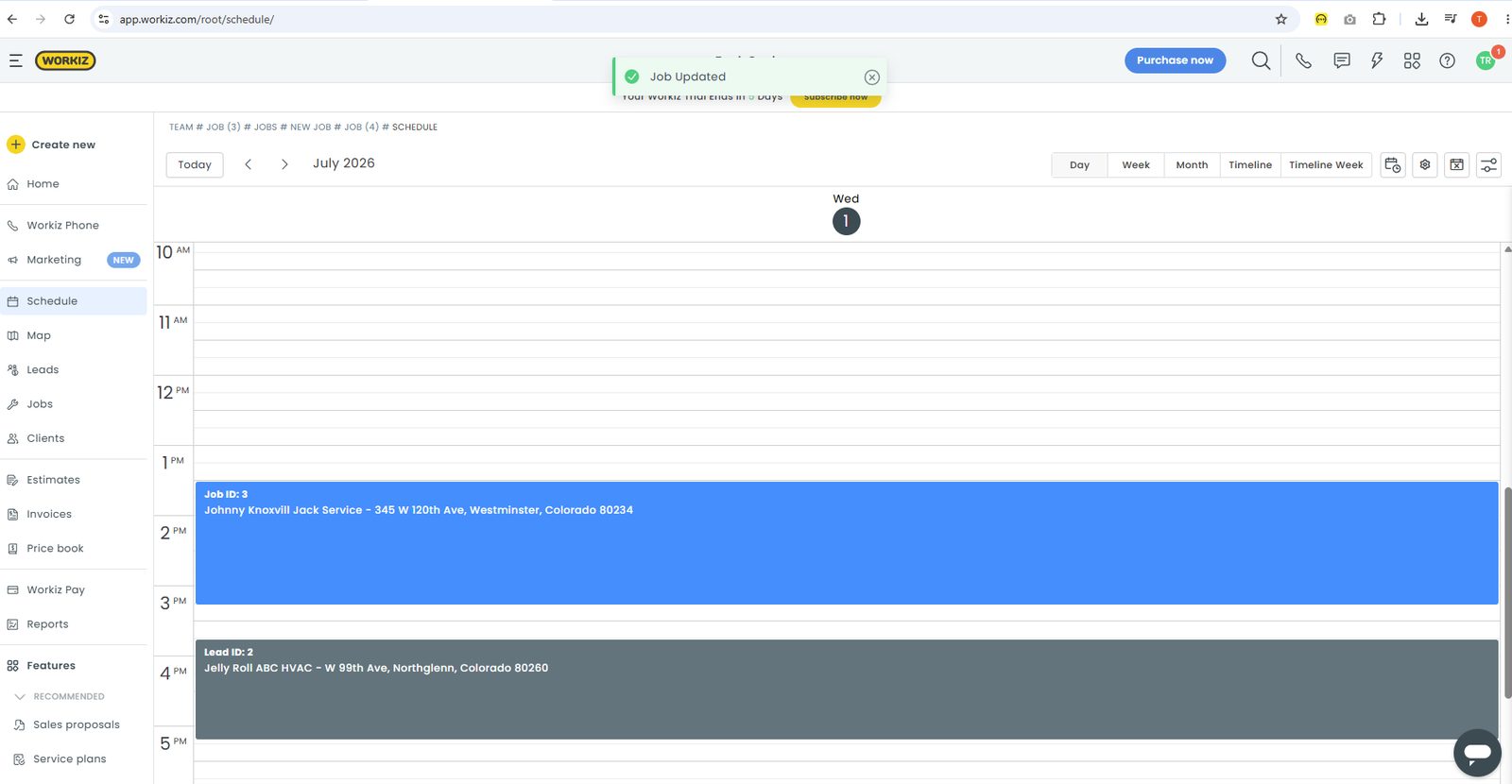
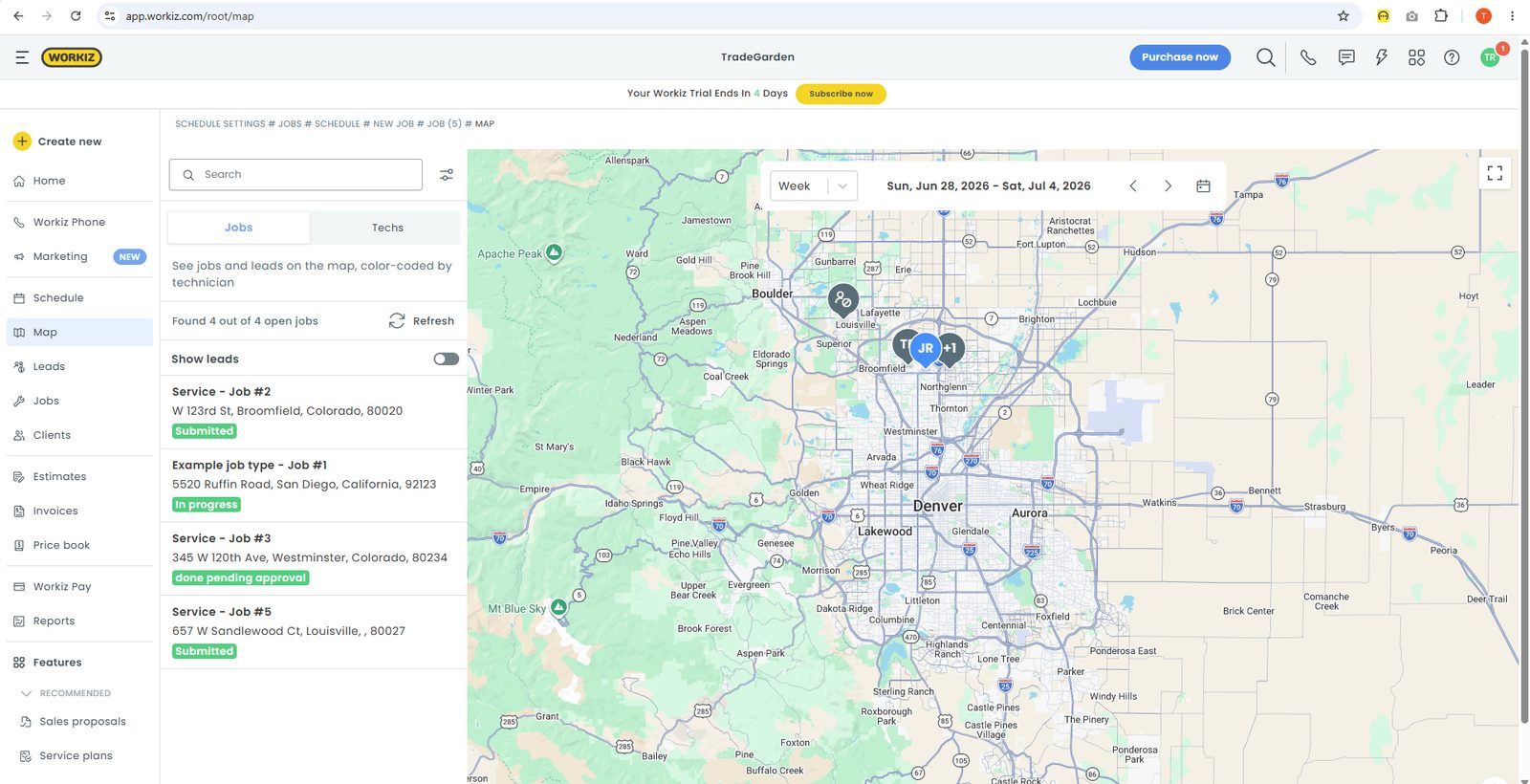
Workiz combines Day, Week, Month, Timeline, and map views with drag-and-drop dispatch — in our testing, the call-to-dispatch workflow was the fastest of the products we reviewed, though schedule conflicts appear side by side rather than being blocked.
Job creation starts with a two-step flow: choose Job, Lead, Event, or Time off, then fill in client, schedule, job type, source, and team. Items, payments, estimates, and equipment can attach to the same job record. Recurring schedules can be set at creation, though converting an existing one-time job into a recurring job was difficult to find afterward.
The calendar is a standout. Workiz exposes Day, Week, Month, Timeline, and Timeline Week as labeled tabs, supports drag-and-drop rescheduling with visual duration handles, and opens jobs in a right-side editor. Schedule conflicts appear side by side rather than being blocked or flagged. Arrival windows are configured at the settings level and apply broadly, which is less flexible than per-job windows on some competitors.
Dispatch is where Workiz separates itself. The dedicated map page includes a Jobs/Techs toggle, live status badges tied to map pins, and a jobs board with status counts. Technicians can be assigned from the job team section with a Send notify action. For high-velocity, phone-heavy businesses, that scheduling-to-dispatch path is one of the fastest we tested.
Workiz Phone
Read moreWorkiz Phone is built into the main navigation as native VoIP — unlike Jobber or Housecall Pro, Workiz logs calls, records conversations, and routes inbound callers directly to client records and job creation without a third-party add-on.
Workiz Phone
Read moreWorkiz Phone is built into the main navigation as native VoIP — unlike Jobber or Housecall Pro, Workiz logs calls, records conversations, and routes inbound callers directly to client records and job creation without a third-party add-on.
Workiz Phone is a dedicated main-nav item, not an add-on — and it is repeatedly cited as the platform’s core differentiator. Built-in VoIP includes automatic call logging, recordings, and a direct path from an inbound caller to client records and job creation.
Two-way SMS is tied into the same communication stack, which helps teams that book and dispatch primarily by phone. Document templates for invoices, estimates, work orders, and payment receipts are confirmed in the product, though broader email marketing automation is less developed than Housecall Pro.
On-my-way and automated customer messaging exist, but they are not marketed or reviewed as heavily as HCP’s automation story. For locksmiths, junk removal, and emergency trades, the phone-to-dispatch loop is the reason to choose Workiz over sidebar-first competitors.
Client management
Read moreWorkiz client records include dedicated Calls and Equipment tabs plus timestamped audit history — stronger than many field service CRMs we tested, but Workiz still lacks duplicate warnings and the named-property model Jobber offers for multi-site commercial accounts.
Client management
Read more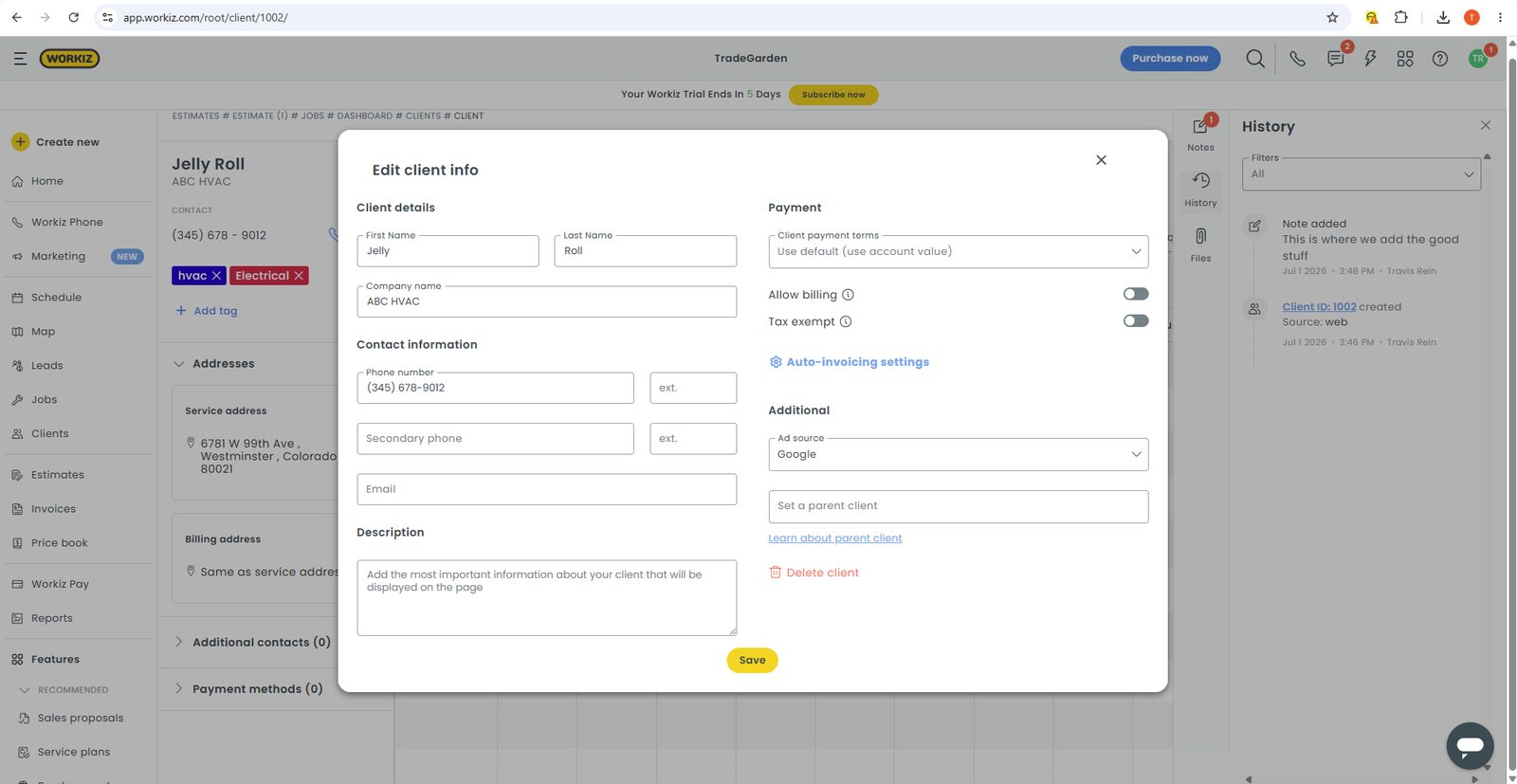
Workiz client records include dedicated Calls and Equipment tabs plus timestamped audit history — stronger than many field service CRMs we tested, but Workiz still lacks duplicate warnings and the named-property model Jobber offers for multi-site commercial accounts.
Creating a client uses a modal form covering name, company, primary and secondary phone with extension, email, ad source, billing permission, tax exemption, and address with a live map. Workiz also prompts users to create custom fields from the first save, which makes the CRM adaptable early.
Saved records include jobs, estimates, invoices, payments, addresses, calls, leads, equipment, tags, and custom fields. Calls and equipment tabs are especially useful for field-service companies. A persistent history panel records timestamped changes, while notes and files stay in a right rail that remains visible as you work.
Multiple addresses are supported with separate service and billing cards, but Workiz lacks the named-property model that helps commercial multi-site accounts. Duplicate detection is a clear gap: we created matching records without a warning and found no merge workflow. CSV import exists but is less discoverable than on the strongest CRM tools we tested.
Estimates and price book
Read moreWorkiz requires estimates to start from an existing job — less flexible than Jobber’s standalone quotes — but its price book supports nested categories, item groups, and kit bundling that scored among the deepest we tested.
Estimates and price book
Read more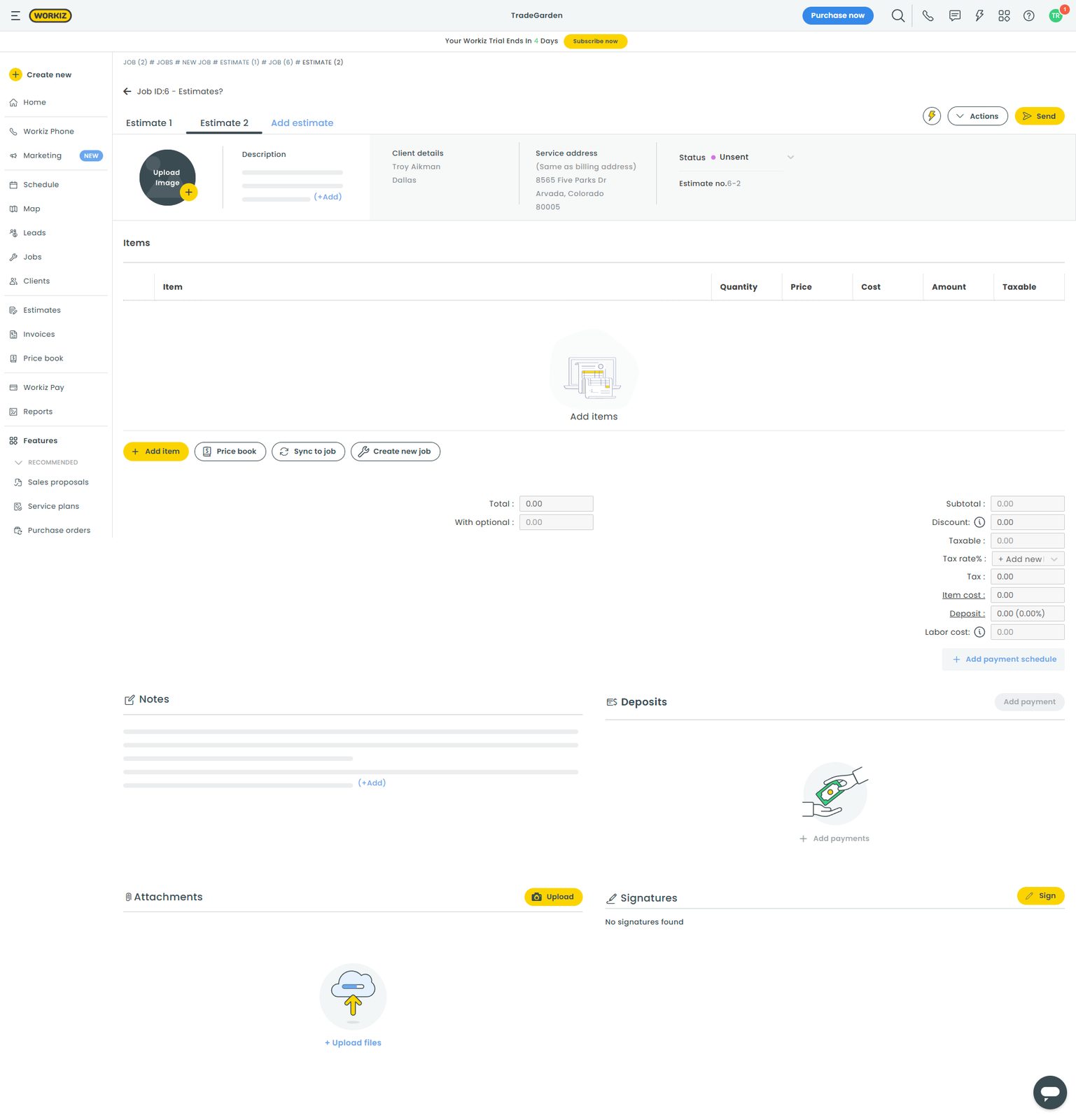
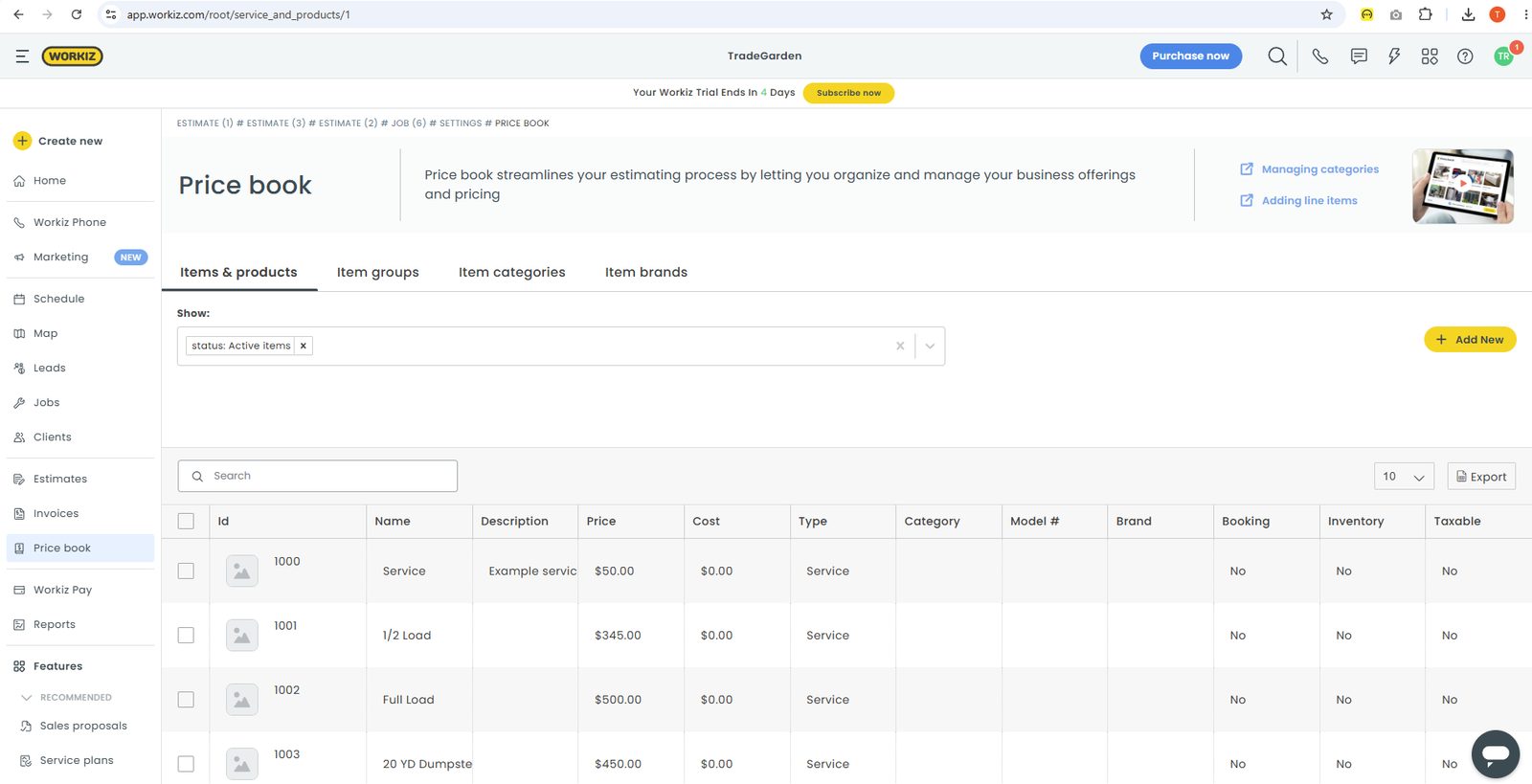
Workiz requires estimates to start from an existing job — less flexible than Jobber’s standalone quotes — but its price book supports nested categories, item groups, and kit bundling that scored among the deepest we tested.
Estimates are created from an existing job rather than as a standalone starting point. That fits inbound work already booked on the calendar, but estimate-first businesses may prefer Jobber’s global new-estimate entry. Estimate 1 and Estimate 2 tabs function like separate versions under one job rather than a framed good/better/best customer choice.
Line items pull cleanly from the price book — named, pre-priced catalog rows can be added in one click. Signatures, preview, download, and save-as-template actions are present on the estimate record.
The price book is one of Workiz’s best areas. Nested item categories, item groups that bundle multiple SKUs into one sellable kit, flat-rate and time-and-materials pricing, and optional item photos and descriptions give operators real control over how they quote. Margin displays on grouped items, though single-item markup fields are less prominent than on some competitors.
Invoicing and payments
Read moreWorkiz offers five invoice themes plus a template designer and Set auto invoicing from the invoice menu — and it is the only product in our comparison with built-in card surcharging that itemizes service fees on customer-facing invoices.
Invoicing and payments
Read more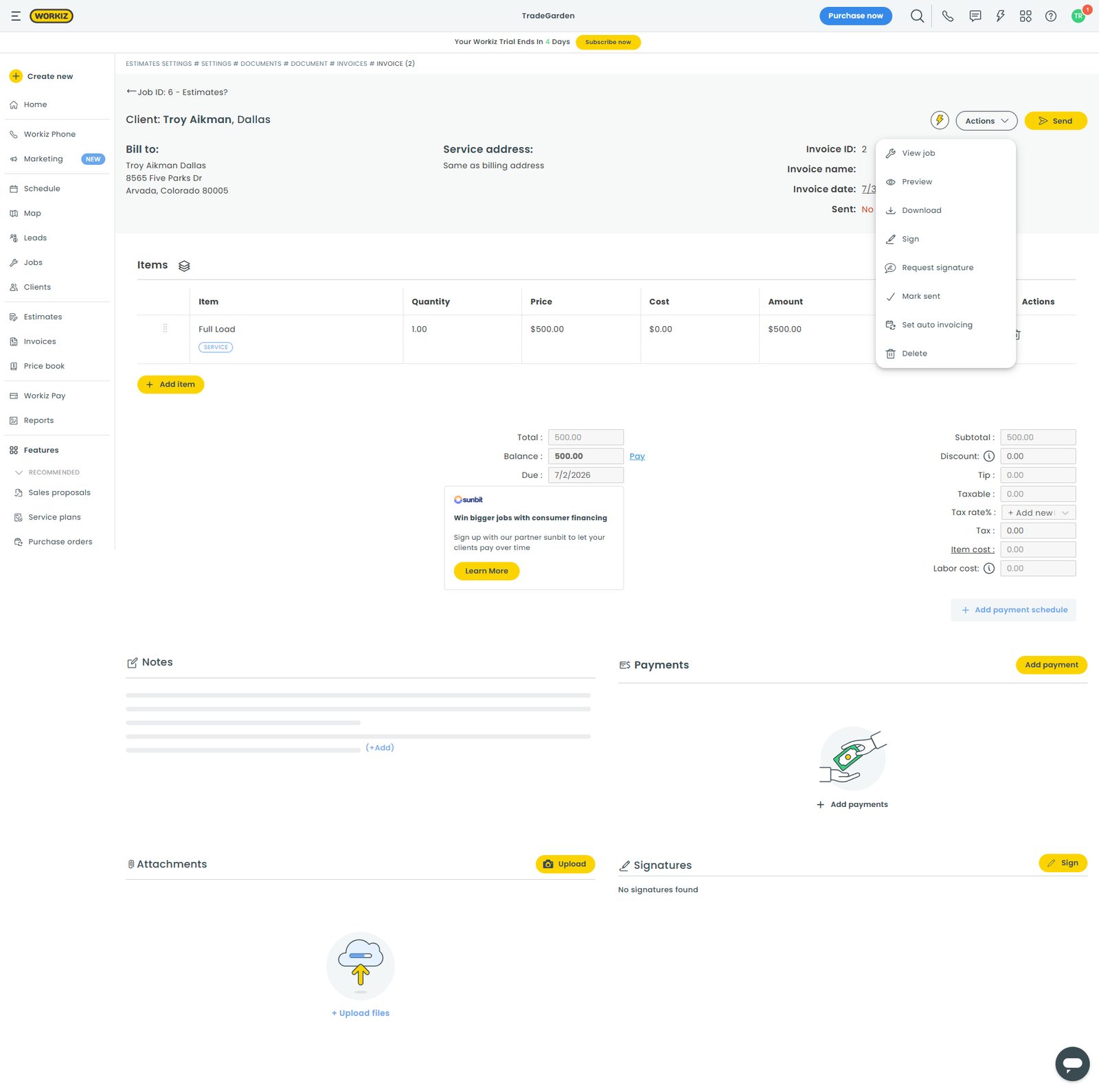
Workiz offers five invoice themes plus a template designer and Set auto invoicing from the invoice menu — and it is the only product in our comparison with built-in card surcharging that itemizes service fees on customer-facing invoices.
Invoices are job-anchored, which keeps billing tied to completed work. Creation, edit, preview, download, signature request, and mark-sent actions live in a practical action menu. Set auto invoicing is available directly from the invoice menu — one of the clearest implementations we saw.
Invoice branding is a standout: five selectable themes plus a template designer with rich-text control over fields. Payment schedules and deposits are supported, and tax rates can be added on the invoice itself.
Workiz Pay supports card-on-file policies, ACH at a documented fee, and consumer financing partners such as Sunbit and Wisetack. The surcharging feature is a genuine differentiator — card service fees can be calculated as a percentage and itemized on the customer-facing invoice where local law allows. Technicians can also collect payments and signatures in the mobile app once Workiz Pay is configured.
Mobile app
Read moreWorkiz’s mobile app handles jobs, payments, signatures, and native timesheets with clock-in/out — a strong feature checklist, but store reviews and our testing noted freezes mid-job and inconsistently documented offline sync compared with Jobber’s mobile stability.
Mobile app
Read more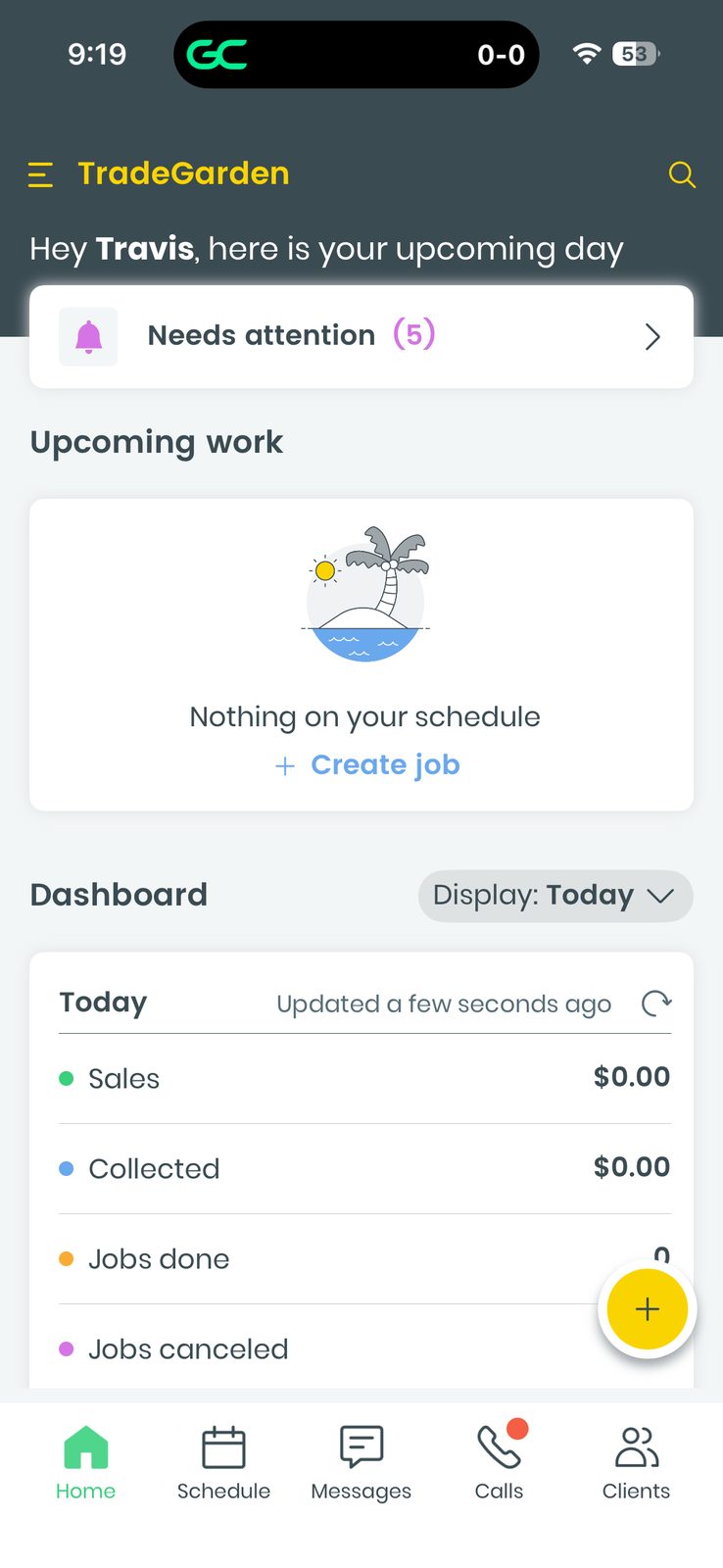
Workiz’s mobile app handles jobs, payments, signatures, and native timesheets with clock-in/out — a strong feature checklist, but store reviews and our testing noted freezes mid-job and inconsistently documented offline sync compared with Jobber’s mobile stability.
The mobile app supports real field workflows. Technicians can create clients and jobs from a single-scroll form with job type and ad source baked in, then manage each job across Details, Finance, and Timeline tabs. Quick actions include Start, ETA, Pay, Add note, and Attach, with an embedded map on the job screen.
Photos attach through a standard camera, gallery, or file picker. Native timesheets include day/week/month views, a running total, and a prominent clock-in/out button. Technicians can navigate to a single job address through the device maps app, though we did not find an aggregate day-route map comparable to Jobber.
Offline behavior is inconsistently documented — vendor materials describe sync-on-reconnect, while independent comparisons disagree. Store ratings look respectable, but multiple reviews describe freezes mid-job. Stability held back the mobile score despite a strong feature checklist.
Reporting & Analytics
Read moreWorkiz puts Reports in the main navigation with export buttons consistently visible on estimates, invoices, and the price book — one of the easier export experiences we tested — though custom reporting and job-cost profitability tools are gated to higher plans.
Reporting & Analytics
Read moreWorkiz puts Reports in the main navigation with export buttons consistently visible on estimates, invoices, and the price book — one of the easier export experiences we tested — though custom reporting and job-cost profitability tools are gated to higher plans.
Reports appear as a main-nav item, but custom and advanced reporting is gated to higher plans. Export buttons are consistently visible on estimates, invoices, and the price book — one of the easier export experiences in the group.
Job costing and profitability are not a strength. Independent comparisons flag limited tools for tracking profitability by job or technician, and dedicated timesheets on desktop were less confirmed than the mobile experience. Plan tier matters: several integration and reporting capabilities only appear once you move up-stack.
Marketing and communication
Read moreWorkiz covers operational messaging — SMS, reminders, on-my-way texts, signatures, and payment links — but native review campaigns and marketing automation are thinner than Housecall Pro’s stack and less polished than Jobber’s client hub experience.
Marketing and communication
Read moreWorkiz covers operational messaging — SMS, reminders, on-my-way texts, signatures, and payment links — but native review campaigns and marketing automation are thinner than Housecall Pro’s stack and less polished than Jobber’s client hub experience.
Workiz covers the operational communication journey well: reminders, on-my-way messaging, documents, signatures, and payment links all support the path from booked job to paid invoice. A client portal exists through estimate and invoice links, though it feels less centrally branded than Jobber’s or Housecall Pro’s dedicated hub experiences.
Marketing is thinner. A Marketing nav item is present, but native review-generation and campaign tools are not marketed or reviewed as deeply as Housecall Pro’s automation stack. Review requests are not a commonly cited Workiz strength.
Lead and job source tracking is solid — a Job source field appears directly on job creation, which helps phone-heavy teams understand which channels drive revenue. For teams that want built-in postcards, review dashboards, or AI campaign tooling, Housecall Pro or Jobber remain stronger fits.
Integrations
Customer Support
Channels
Phone, chat, and email
Hours
Not publicly listed consistently
Avg Response
Fast during sales and onboarding; complex escalations may take a week or longer