
Jobber is the cleanest, most intuitive field service app we tested. It leads our comparison on ease of use, client experience, and commercial property management — though cost per user rises sharply at small team sizes. We tested 95 individual elements across onboarding, CRM, scheduling, dispatch, estimates, invoicing, payments, communication, reporting, mobile use, pricing, and support. Jobber earned a TradeGarden score of 8.2/10.

Jobber
Trade Categories
Software Categories
Affiliate disclosure: Some links on this page are affiliate links. We earn a commission at no cost to you. This never influences our rankings. Read our methodology.
Quick Verdict
The cleanest, most intuitive field service app tested. Jobber leads on ease of use, client experience, and commercial property management. Higher per user costs for smaller team sizes.
What We Like
- Cleanest UI and easiest navigation of all products tested
- Handles multi-site commercial accounts better than most competitors
- Duplicate customer detection fires automatically on name match
- First Steps onboarding tab persists and never disappears
- Strongest app stability — no lagging or disconnect during our testing
What Could Improve
- Higher cost per user for small team sizes of 1–5 users
- GPS live tracking requires FleetSharp hardware add-on — not native
- Review management requires NiceJob third-party add-on for full capability
- Two-way texting exists but less natively integrated than Workiz's phone system
- Lighthouse performance score of 30 on desktop — slow performance
How We Tested Jobber
We evaluated Jobber using the same TradeGarden rubric applied to every field service platform — 95 scored elements across scheduling, CRM, invoicing, mobile, and support, tested hands-on in live accounts rather than from marketing materials.
Each item was scored through our hands-on pass and cross-checked against an independent AI-assisted pass, with manual audits wherever the two diverged. Read our full methodology.
Last tested: July 22, 2026
Pricing
Core
$49/month
- Book and schedule jobs online
- Send professional quotes and invoices
- Receive online payments
- Built-in reporting and 100+ app marketplace integrations
Best Value!
Connect
$139/month
- All Core features, plus:
- Automated client reminders and payment collection
- Job checklists and quote or invoice follow-ups
- QuickBooks Online sync and time tracking
Most Popular
Grow
$199/month
- All Connect features, plus:
- Customize quotes with rich visuals and reviews
- Upsell services with optional line items
- Track time automatically
- Track profitability with job costing
- Connect with customers through two-way SMS
- Build custom workflow automations
Pricing verified July 2026. Jobber updates pricing periodically.
Who Should Use This Software?
Great For
- Residential service businesses wanting the most polished client-facing experience
- Commercial accounts managing multiple service properties per customer
- Teams of 3–10 techs wanting clean scheduling without enterprise complexity
- Businesses prioritizing ease of use and fast, low-friction onboarding
Consider Alternatives If…
- You need built-in marketing automation + review management → Housecall Pro
- You're a call-heavy on-demand trade needing a built-in phone system → Workiz
- You have 20+ techs and need fleet tracking built in → Service Fusion
- Your budget is tight at 1–2 users → Crew Control
Not Ideal For
- 1–3 person shops where cost per user is high compared to alternatives
- Businesses needing built-in marketing automation or review management without add-ons
- High-volume on-demand dispatch operations needing real-time GPS without hardware add-ons
- Shops needing the fastest web app load times
FAQs
How much does Jobber actually cost per month?
For a solo operator (1 user, monthly billing), Jobber costs $49/mo for Core, $139/mo for Connect, and $199/mo for Grow — matching the prices we verified in-product. Larger teams add a Plus tier (from $499/mo for 5 users; scales with headcount). Jobber Payments runs 2.9% + $0.30 per card and 1% for ACH. Annual billing may reduce the monthly rate at checkout.
How does Jobber compare to other field service software?
Jobber leads this group on ease of use, client experience, and commercial property management. Choose Housecall Pro if you want built-in marketing automation and review tools without add-ons. Choose Workiz if inbound phone calls and call-to-dispatch speed are central to your operation. Choose Service Fusion for larger teams needing native fleet tracking.
Does Jobber offer a free plan or free trial?
Jobber offers a 14-day free trial with no credit card required. Use the trial to import sample customers, schedule test jobs, and evaluate the mobile app before subscribing. There is no permanent free plan for active businesses.
Does Jobber integrate with QuickBooks?
Yes. Jobber syncs with QuickBooks Online on Connect plans and above. We also confirmed integrations with Xero, Stripe, Mailchimp, and Zapier during hands-on testing.
What types of businesses is Jobber best for?
Jobber is best for small home service businesses — solo operators through roughly 15-person teams — especially residential trades wanting a polished client portal and commercial accounts managing multiple named service properties per customer.
Product Details
Scheduling and dispatch
Read moreDual system: quick-add popup (client, title, line item, assign, time, "show availability") plus a full detail page with recurring toggle, arrival window, checklist, split billing, product/service lines.
Scheduling and dispatch
Read more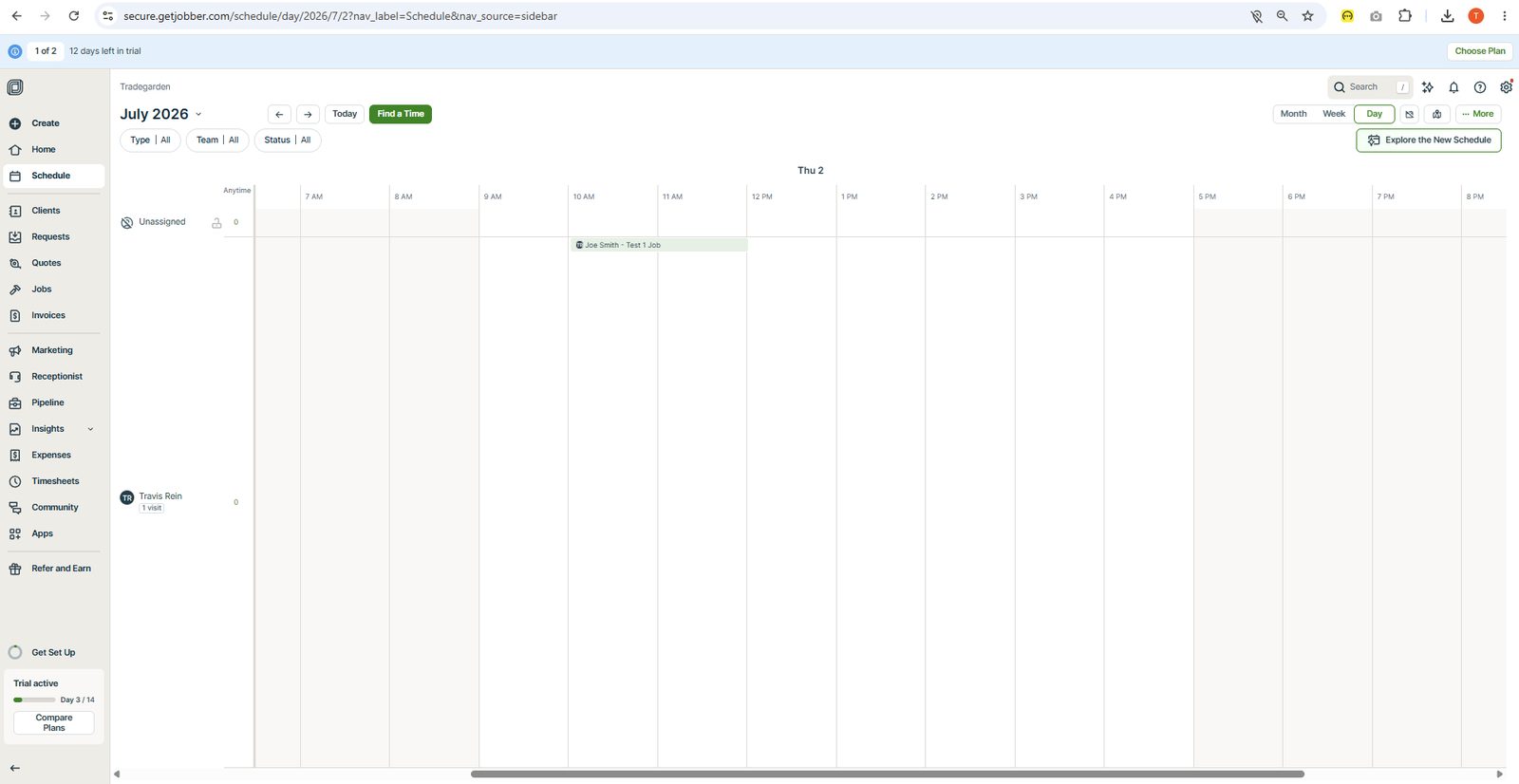
Dual system: quick-add popup (client, title, line item, assign, time, "show availability") plus a full detail page with recurring toggle, arrival window, checklist, split billing, product/service lines.
Dual system: quick-add popup (client, title, line item, assign, time, "show availability") plus a full detail page with recurring toggle, arrival window, checklist, split billing, product/service lines. Most flexible of the three.
Easily performs drag and drop with a visual ability to slide the length of a service. Can easily move to a different date. On click of box, can easlity modify the job or edit. Uses a modal popup to modify the job.
Day, Week, Month confirmed. A "New Schedule" banner hints at a map/timeline view in beta, but nothing map-like is confirmed in the current view.
Explicit "One-off / Recurring" toggle plus a "Repeats: Does not repeat" dropdown right on the job creation page - clearest recurring setup of the three. However, once the job is created is somewhat a challenge to figure out where to change the recurring schedule.
There is a fixed arrival window created at the settings level and appreared to apply to all jobs. Could not be set at a job type or individual job level
Assigned field with a removable tag and dropdown arrow (quick-add popup also has "+Assign") - multi-select implied but only one assignee shown in screenshots. However, no ability to asign to crews. Within the schedule page, you can see which people are assigned by job and do a sort by crewememenber
Show availability toggle in the quick-add popup, and red "no-entry" style icons appear on some scheduled blocks in the week view - suggests a built-in conflict/unavailability flag, though its exact trigger isn't confirmed.
Job popup has a "Completed" checkbox; Settings has dedicated "Completed appointment styling" options (Grayed out / Strikethrough) - a real status-styling system. Schedule box changes to grey when marked as completed. The colors respresent the customer right now. A red box is placed at top of schedule for jobs not paid.
Client management
Read moreFull-page form: title, first/last name, company, phone, email, communication settings, lead source, additional details (collapsed), additional contacts (collapsed), property address with "Add Another Address" inline, tax rate per property, property details, property contacts.
Client management
Read more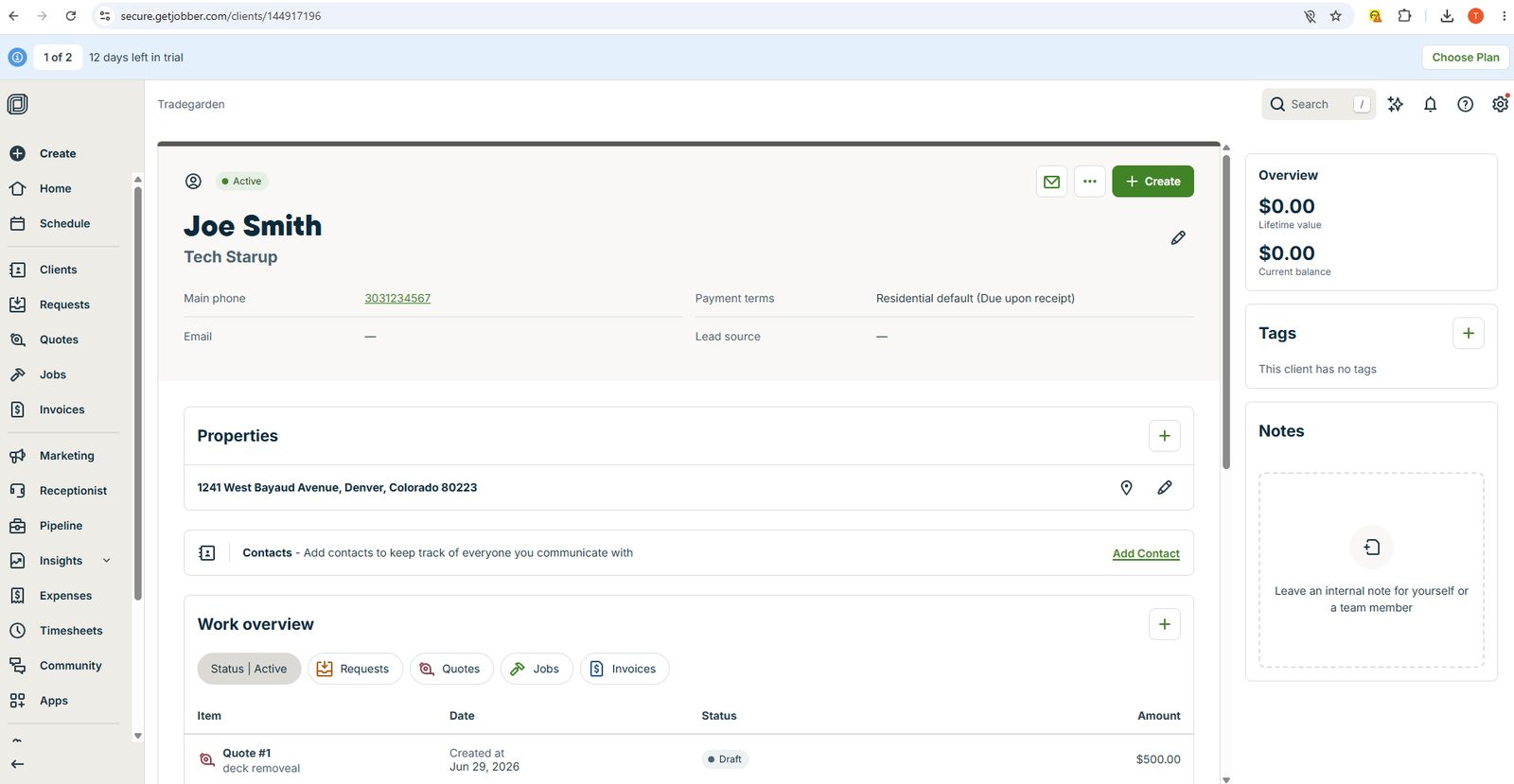
Full-page form: title, first/last name, company, phone, email, communication settings, lead source, additional details (collapsed), additional contacts (collapsed), property address with "Add Another Address" inline, tax rate per property, property details, property contacts.
Full-page form: title, first/last name, company, phone, email, communication settings, lead source, additional details (collapsed), additional contacts (collapsed), property address with "Add Another Address" inline, tax rate per property, property details, property contacts. "Save and Create Another" for batch entry. Clean progressive disclosure.
Inline edit pencil on every individual section — no full edit mode required. Each section edits independently. Lowest-friction editing of the three.
Name, company, phone, payment terms, lead source, Properties (multi), Contacts, Work overview (Requests/Quotes/Jobs/Invoices tabs), Billing, Payment methods, Client schedule, Recent pricing (quoted vs job side by side). Right rail: lifetime value, current balance, Tags, Notes. Customizable section order. Recent pricing is a standout differentiator.
Named properties (e.g. "Downtown") each with name, address, tax rate, property details, property contacts, "Show on Map." Properties searchable within the record. The named property model is the most capable for commercial clients with multiple sites.
Work overview with filterable tabs (Requests, Quotes, Jobs, Invoices) + Client schedule + Recent pricing panel. Not a true unified timeline — grouped by type not time. Strong for filtered views; can't see everything in one stream.
Tags in right rail with edit pencil. Free-form tag entry. Customizable section order on record. Custom fields not confirmed from screenshots.
Notes in right rail with author, timestamp, "Linked note" label. Notes linkable to specific records. No attachment area confirmed from screenshots.
DETECTS — "Possible duplicate client" modal fires automatically on name match. Shows existing record with name, property count, phone, status, and tags. Offers Cancel or "Create Client Anyway" — warns without blocking. Matches on name, company, or email. Best duplicate handling of the three.
Estimates and price book
Read moreDashboard-first approach (Draft/Sent/Converted metrics, conversion rate) with a template-prompt on creation.
Estimates and price book
Read more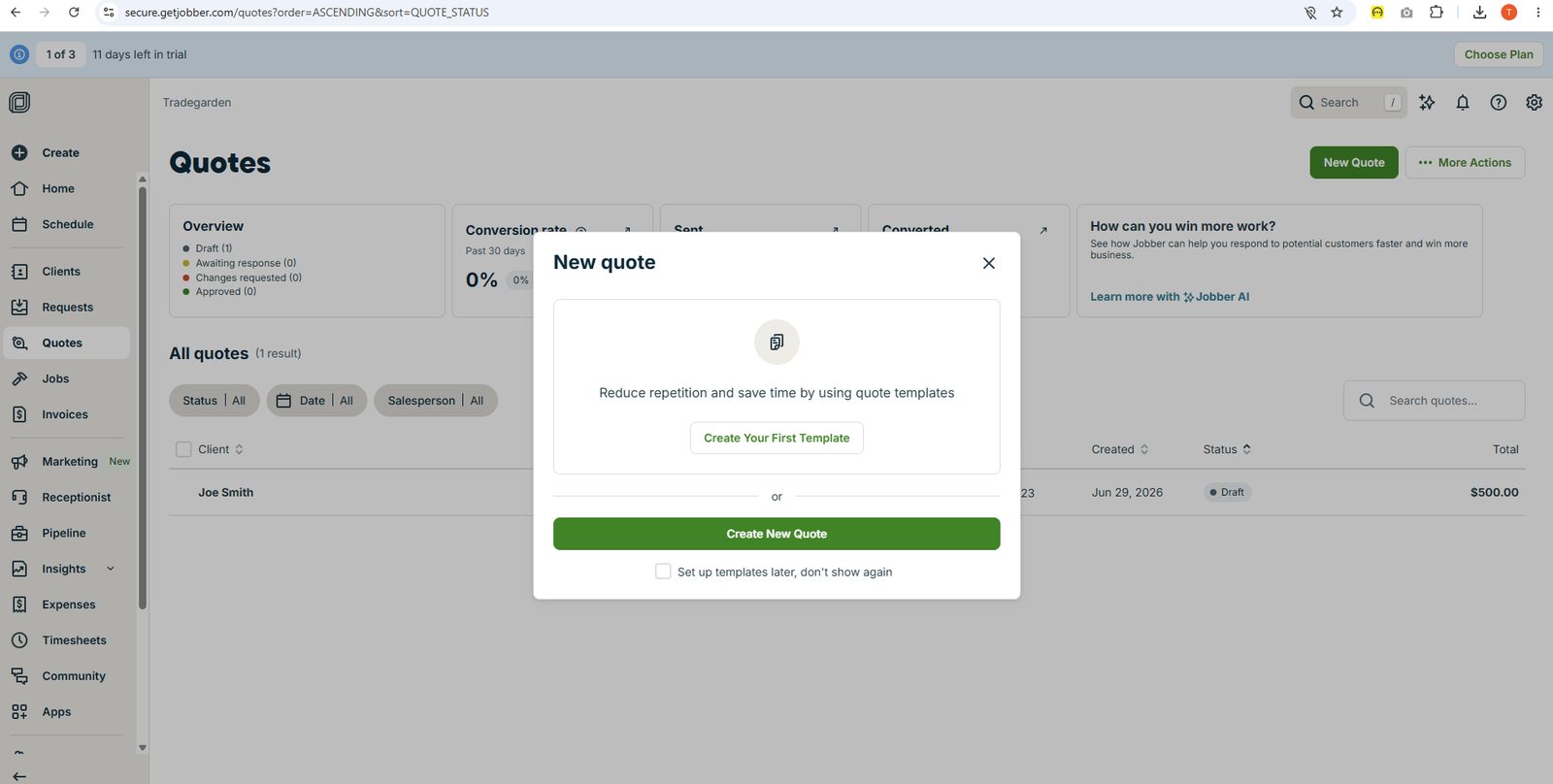
Dashboard-first approach (Draft/Sent/Converted metrics, conversion rate) with a template-prompt on creation.
Dashboard-first approach (Draft/Sent/Converted metrics, conversion rate) with a template-prompt on creation. Solid but line items are simpler, no property photo/map context.
Full "More" action menu (Convert to Job, Create Similar Quote, Mark as Approved/Awaiting Response, Preview as Client, Collect Signature, Print/Save PDF) - most complete single-menu action set.
Online claims it possible by creating different quotes. So this is a difference in their approach. Workiz needs a job to create quotes. Others you can create quotes without the job created. Its an interesting approach on the heiarchy but not the right direction
It is an ok version on how to pull them out of a pricebook. I'm worried for how they are presented once the pricebook gets too long.
Collect Signature and "Preview as Client" actions confirmed, plus manual "Mark as Approved" status option.
Explicit "Convert to Job" action confirmed directly in the quote's action menu.
"Add New Product/Service" modal covers Item type, Name, Description, Cost, Markup%, Unit Price, image upload, tax exemption, and a unique Online Booking duration/quantity setting.
Creating a quote for flat rate vs time and material is possible in jobber but it isn't as automated as the others.
Invoicing and payments
Read moreFull builder (Subject, Invoice #, Payment terms, Salesperson, Product/Service line items, Discount, Tax, Contract/Disclaimer, Notes) plus a "Select jobs to invoice" modal that pulls uninvoiced job amounts directly in.
Invoicing and payments
Read more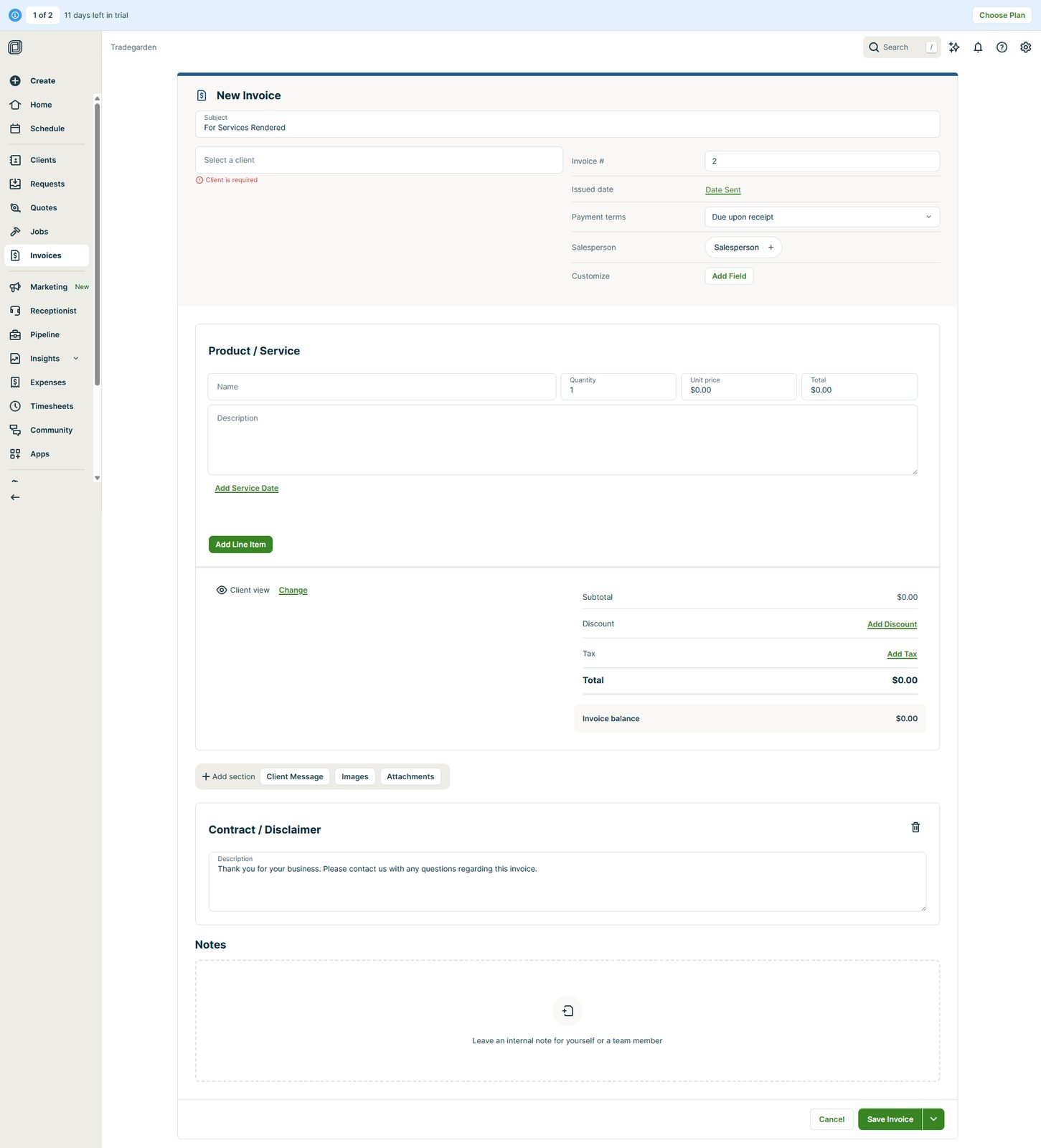
Full builder (Subject, Invoice #, Payment terms, Salesperson, Product/Service line items, Discount, Tax, Contract/Disclaimer, Notes) plus a "Select jobs to invoice" modal that pulls uninvoiced job amounts directly in.
Full builder (Subject, Invoice #, Payment terms, Salesperson, Product/Service line items, Discount, Tax, Contract/Disclaimer, Notes) plus a "Select jobs to invoice" modal that pulls uninvoiced job amounts directly in.
"More" action menu (Text Message, Mark as Sent, Collect Payment, Preview as Client, Collect Signature, Print/Save PDF, Delete) - comprehensive single-menu action set.
Screenshots undersold this: vendor docs confirm a full Business Profile branding system - logo, main/accent brand colors (hex or picker), header layout choice, header color, footer font size, and show/hide toggles for phone/email/website/custom fields. However, multiple independent reviews (Capterra, G2, FieldCamp) consistently flag "limited ability to customize quotes or invoices" and describe the design options as "dated compared to alternatives" - so real-world customization depth trails the settings-page feature list.
"Select jobs to invoice" modal shows uninvoiced job totals ready to pull in - semi-automated, but still a manual selection step.
Screenshots undersold this significantly. Jobber has a full Progress Invoicing system (added Nov 2025, called out in reviews as "a welcome addition"): deposits by % or fixed $, milestone/percentage-based payment schedules, automatic payments via stored card, and partial payments in Client Hub. One recurring review complaint: line items on progress invoices can't be edited directly (must edit the job first) - a real but minor workflow friction, not a feature gap.
Screenshots undersold this. Vendor docs confirm multiple named tax rates, tax groups (combining rates for jurisdictions needing more than one tax), per-property tax rate overrides, a Tax ID field for invoices, a dedicated Taxation Report, and per-item "exempt from tax" checkboxes. One credible independent review (Connecteam) notes you can't easily apply different tax rates to different line items on the same quote/invoice.
Send Email and Text Message confirmed in the action menu; Print/Save PDF also listed.
Jobber Payments setup is a simple 2-step flow (verify business details, connect bank via Plaid). Multiple payment methods (cash, check, card, ACH, PayPal-style options) were directly visible in the earlier payment screenshot. [Research-based: vendor docs + Capterra/G2/comparison reviews; not directly confirmed via screenshots.]
Mobile app
Read moreSingle continuous scrolling form; minimal modal-hopping Inferred from docs — checklists, custom fields, invoicing, team/schedule on one page Docs confirm cached view + auto-sync…
Mobile app
Read more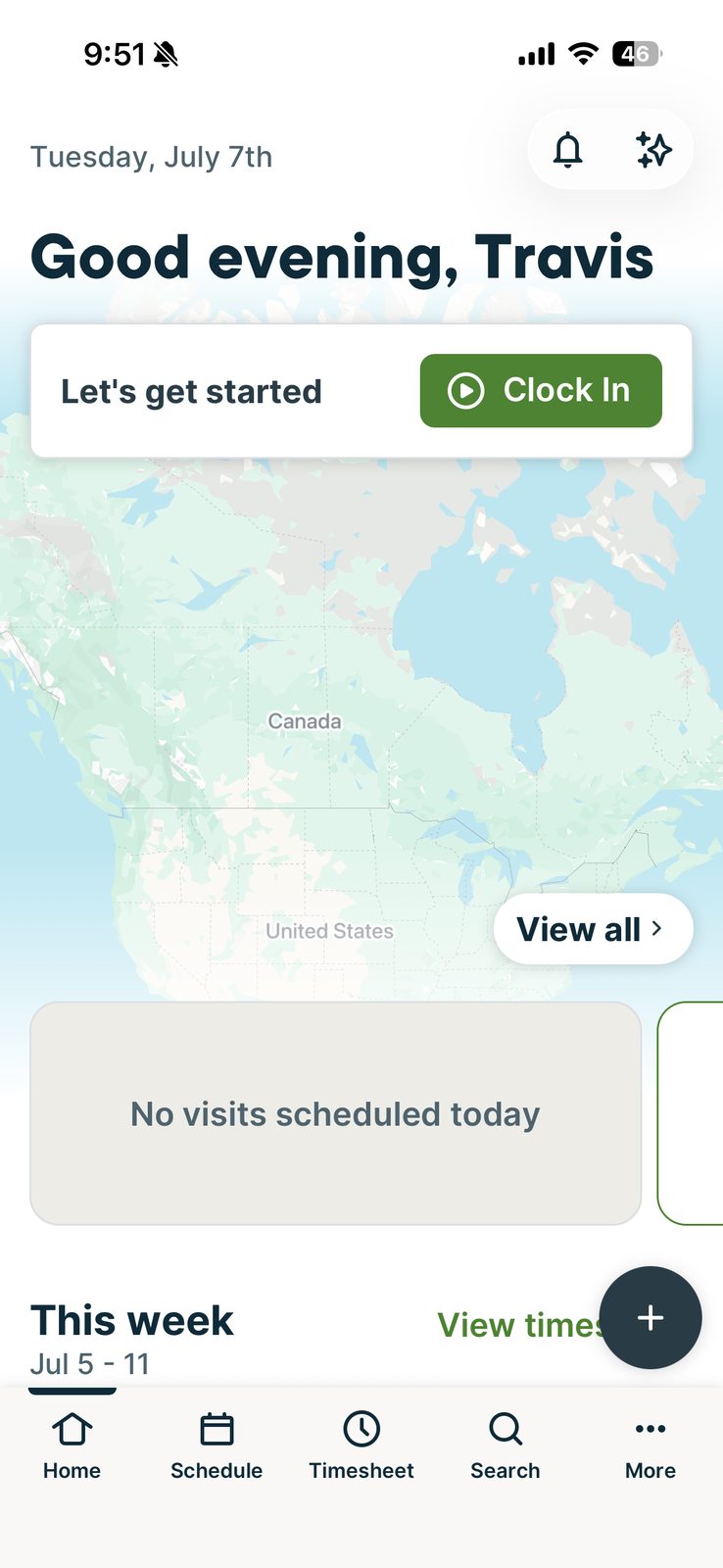
Single continuous scrolling form; minimal modal-hopping Inferred from docs — checklists, custom fields, invoicing, team/schedule on one page Docs confirm cached view + auto-sync…
Single continuous scrolling form; minimal modal-hopping
Inferred from docs — checklists, custom fields, invoicing, team/schedule on one page
Docs confirm cached view + auto-sync of notes/attachments; can't create jobs/take payments offline
Checklist photo uploads + client-level Files/Media gallery
Clean Clock In/Out, live timer, multi-category tracking (Visit/Driving/Office/Supplies/Break/General)
Tap to Pay, saved cards, offline-payment recording, dedicated signature pad w/ auto-saved PDF
Built-in Map tab showing all of the day's job pins; hands off to preferred maps app for turn-by-turn
Strong, consistent reputation ("no lagging or disconnecting," 4.5 star avg)
Reporting & Analytics
Read moreAn independent in-depth review explicitly calls Jobber's reporting 'the weakest feature' (scored 5/10 in that review), citing no custom report builder and no technician performance dashboards — though a Taxation Report and Insights nav section were directly confirmed in earlier screenshots.
Reporting & Analytics
Read more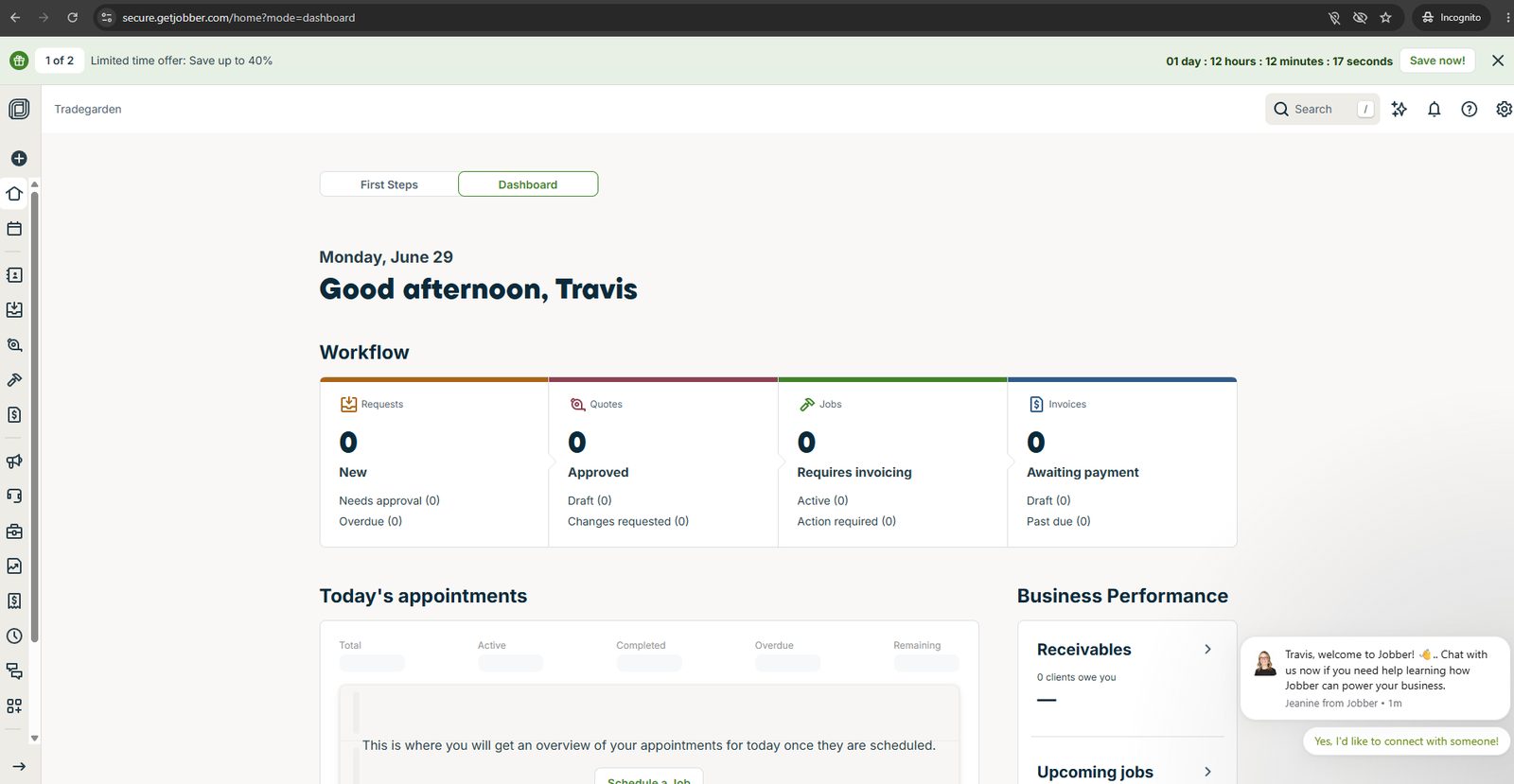
An independent in-depth review explicitly calls Jobber's reporting 'the weakest feature' (scored 5/10 in that review), citing no custom report builder and no technician performance dashboards — though a Taxation Report and Insights nav section were directly confirmed in earlier screenshots.
An independent in-depth review explicitly calls Jobber's reporting 'the weakest feature' (scored 5/10 in that review), citing no custom report builder and no technician performance dashboards — though a Taxation Report and Insights nav section were directly confirmed in earlier screenshots. [Research-based: vendor docs + Capterra/G2/comparison reviews; not directly confirmed via screenshots.]
Explicitly called out in an independent in-depth review as lacking a custom report builder — named as a specific gap, not just a general weakness. [Research-based: vendor docs + Capterra/G2/comparison reviews; not directly confirmed via screenshots.]
An Insights nav section was confirmed directly in earlier screenshots, but general reporting weakness (per independent review) likely extends to dashboard depth as well; no KPI-dashboard specifics were independently confirmed. [Research-based: vendor docs + Capterra/G2/comparison reviews; not directly confirmed via screenshots.]
CSV export is explicitly confirmed in Jobber's own Products & Services documentation, plus Transactions/Taxation reports are described as exportable. [Research-based: vendor docs + Capterra/G2/comparison reviews; not directly confirmed via screenshots.]
GPS-based automatic time tracking is confirmed — clocking in/out as employees arrive at or leave job sites — described in independent comparisons as the most automated of the three tools. [Research-based: vendor docs + Capterra/G2/comparison reviews; not directly confirmed via screenshots.]
Job costing is confirmed as a feature of the Grow plan tier (real-time profitability by materials/labor); Cost breakdown and Profit/Loss fields were also directly visible in Jobber's own estimate screenshots earlier in this review. [Research-based: vendor docs + Capterra/G2/comparison reviews; not directly confirmed via screenshots.]
Gusto payroll integration is confirmed, and commission/spiff tracking on sales is documented via a third-party accounting integration guide (tracked in Jobber, synced through to QuickBooks payroll). [Research-based: vendor docs + Capterra/G2/comparison reviews; not directly confirmed via screenshots.]
Marketing and communication
Read moreRelies on the same third-party NiceJob add-on noted above for full review generation/reputation management rather than a fully native tool.
Marketing and communication
Read moreRelies on the same third-party NiceJob add-on noted above for full review generation/reputation management rather than a fully native tool.
Relies on the same third-party NiceJob add-on noted above for full review generation/reputation management rather than a fully native tool. [Research-based: vendor docs + Capterra/G2/comparison reviews; not directly confirmed via screenshots.]
A Marketing Suite add-on (~$79/month) with Mailchimp integration provides email campaigns; no native postcard/direct-mail automation was found in research. [Research-based: vendor docs + Capterra/G2/comparison reviews; not directly confirmed via screenshots.]
Lead source tracking wasn't directly confirmed in Jobber screenshots or strongly documented independently; Jobber's CRM tracks client records generally but a dedicated lead-source field/report wasn't specifically confirmed. [Research-based: vendor docs + Capterra/G2/comparison reviews; not directly confirmed via screenshots.]
Not confirmed — no built-in phone/VoIP or call-tracking feature found in Jobber's documentation; Jobber instead offers this via a separate paid AI Receptionist add-on ($99/month) rather than native call tracking. [Research-based: vendor docs + Capterra/G2/comparison reviews; not directly confirmed via screenshots.]
Automated reminders and on-my-way texts are confirmed in vendor marketing materials as core, built-in features. [Research-based: vendor docs + Capterra/G2/comparison reviews; not directly confirmed via screenshots.]
Two-way texting is supported through Client Hub communication, but is generally described in comparisons as less natively integrated than Workiz's built-in phone system. [Research-based: vendor docs + Capterra/G2/comparison reviews; not directly confirmed via screenshots.]
Customizable email/SMS invoice templates were confirmed directly in screenshots; broader marketing email automation leans on a Mailchimp integration rather than being fully native. [Research-based: vendor docs + Capterra/G2/comparison reviews; not directly confirmed via screenshots.]
Basic automated review requests are confirmed in all plans (email with links to review profiles), but deeper reputation management requires a third-party add-on (NiceJob), adding real cost. [Research-based: vendor docs + Capterra/G2/comparison reviews; not directly confirmed via screenshots.]
Integrations
Customer Support
Channels
Phone, chat, email, help center
Hours
Not publicly listed
Avg Response
Varies by plan and issue complexity