
Crew Control is a lightweight, browser-based scheduler built for lawn care and landscaping crew dispatching. It sets up fast and dispatches well, but lacks depth in CRM, invoicing, and mobile field work. We tested 95 individual elements across onboarding, CRM, scheduling, dispatch, estimates, invoicing, payments, communication, reporting, mobile use, pricing, and support. Crew Control earned a TradeGarden score of 6.8/10.
Crew Control
Trade Categories
Software Categories
Affiliate disclosure: Some links on this page are affiliate links. We earn a commission at no cost to you. This never influences our rankings. Read our methodology.
Quick Verdict
Crew Control is a lightweight, browser-based scheduler built for lawn care and landscaping crew dispatching. It sets up fast and dispatches well, but lacks depth in CRM, invoicing, and mobile field work.
What We Like
- Crew dispatch calendar is clean and purpose-built for the target user
- Nested product categories and Product Groups (flat-rate bundles) are solid
- Tiered markup tables with cost-range rules are well implemented
- Sales Board Kanban pipeline provides useful CRM-lite lead tracking
- Fast to set up — onboarding praised as up in hours across reviews
What Could Improve
- Entirely browser-based mobile — no native app, no offline mode
- Customer management is very lightweight: no multi-address, no timeline, no tags
- Data import requires paid customer service assistance — not self-serve
- No duplicate detection, no e-signature, no Good/Better/Best estimates
- No GPS/fleet tracking and no real-time technician status
How We Tested Crew Control
We evaluated Crew Control using the same TradeGarden rubric applied to every field service platform — 95 scored elements across scheduling, CRM, invoicing, mobile, and support, tested hands-on in live accounts rather than from marketing materials.
Each item was scored through our hands-on pass and cross-checked against an independent AI-assisted pass, with manual audits wherever the two diverged. Read our full methodology.
Last tested: July 22, 2026
Pricing
Base
Core crew scheduling and dispatch for small lawn and landscape teams.
$39/month
billed monthly
1–3 users
- Crew dispatch calendar
- Job scheduling
- Basic customer records
- Product catalog and flat-rate bundles
- Sales board pipeline
- Browser-based mobile access
Best Value!
Plus
Adds advanced scheduling and business tools for growing crews.
$59/month
billed monthly
1–3 users
- All Base features, plus:
- Advanced crew routing
- Tiered markup tables
- Enhanced reporting
- Priority support
Pricing verified July 2026. Crew Control updates pricing periodically.
Who Should Use This Software?
Great For
- Small to mid-size lawn care and landscaping companies dispatching crews
- Owner-operators who need simple crew scheduling with minimal training time
- Businesses that are primarily managed from the office with crews in the field
- Companies already in the Aspire ecosystem looking for a lighter scheduling tier
Consider Alternatives If…
- You need invoicing and payment collection depth beyond basic billing → Jobber or Housecall Pro
- Your techs need a reliable native mobile app with offline capability → Service Fusion or Workiz
- You need customer history, CRM depth, or e-signatures → Jobber
- You're not in lawn care or landscaping → Jobber, Housecall Pro, Workiz, or Service Fusion
Not Ideal For
- Any business needing strong invoicing or payment collection in the field
- Companies with services outside of lawn care and landscaping
- Businesses needing techs to work offline or in low-connectivity areas
- Teams that need e-signatures, customer portals, or GPS tracking
FAQs
How much does Crew Control actually cost per month?
Crew Control lists Base at $39/mo and Plus at $59/mo for small teams (typically 1–3 users) — prices we verified in July 2026. Payment processing rates are not publicly disclosed.
How does Crew Control compare to other field service software?
Crew Control is narrower and faster to set up than Jobber or Housecall Pro, but lacks deep CRM, invoicing, and native mobile apps. Choose Jobber or Housecall Pro when you need full client management and payments; Service Fusion or Workiz when you need fleet GPS or phone-first dispatch.
Does Crew Control offer a free plan or free trial?
Yes — Crew Control offers a 14-day free trial with no credit card required.
Does Crew Control integrate with QuickBooks?
Yes. Crew Control integrates with QuickBooks Online for accounting sync.
What types of businesses is Crew Control best for?
Crew Control fits small lawn care and landscaping companies that dispatch crews from the office and want a lightweight scheduler — especially owner-operators with 1–3 users already in or considering the Aspire ecosystem.
Product Details
Scheduling and dispatch
Read moreCrew Control's crew dispatch calendar is clean and purpose-built for lawn and landscape routing — jobs can be created from the calendar with weekly and day views, though map views and recurring jobs are less prominent than on full FSM platforms.
Scheduling and dispatch
Read more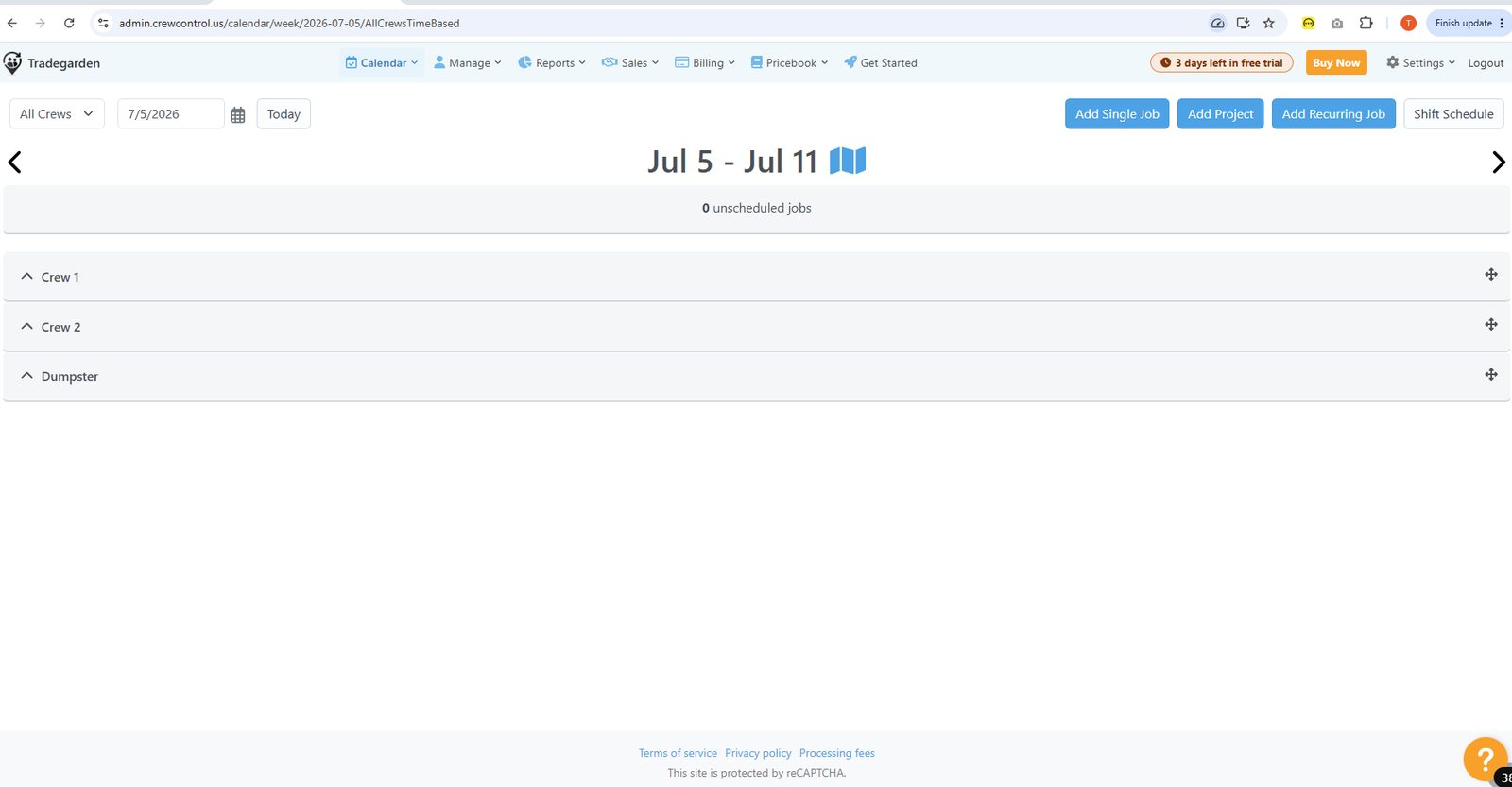
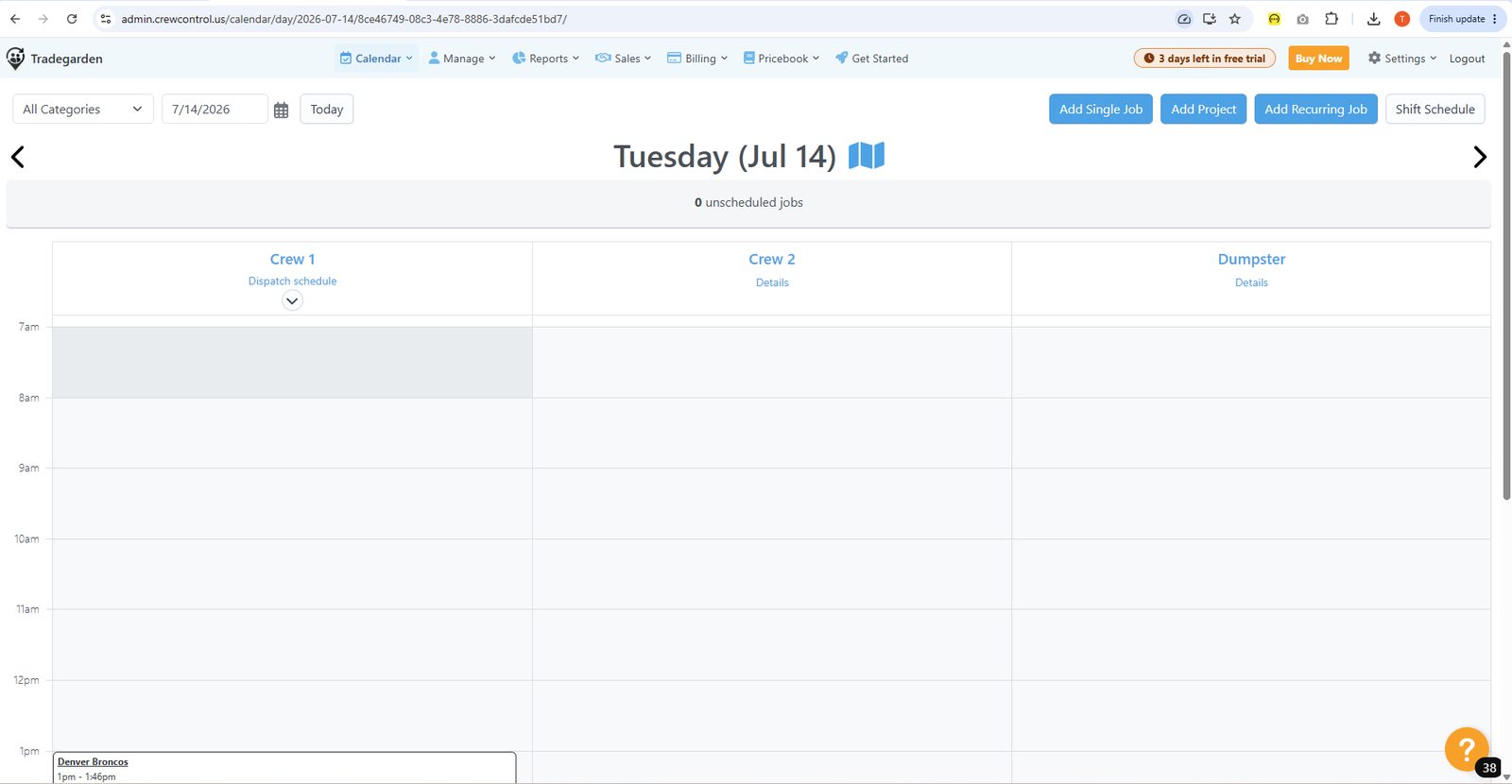
Crew Control's crew dispatch calendar is clean and purpose-built for lawn and landscape routing — jobs can be created from the calendar with weekly and day views, though map views and recurring jobs are less prominent than on full FSM platforms.
Crew Control job creation not directly screenshotted as a creation form. Calendar screenshot confirms jobs can be created by clicking into calendar. Invoice and billing views confirm jobs exist and generate invoices. Creation form appears simpler than SF based on overall platform design. [Research-based; no job creation form screenshot]
Calendar screenshots show weekly view with job blocks. Drag-and-drop likely supported given the calendar interface, but no explicit drag interaction was screenshotted. [Research-based; calendar UI visible but drag interaction not confirmed in screenshots]
Calendar screenshots show weekly and day-level views. Month view tab likely exists given the interface pattern. No map view or specialized timeline views were captured. Navigation appears top-bar based rather than sidebar, limiting view discoverability. [Primarily screenshot-based for weekly view; research-based for others]
No recurring job screenshot for Crew Control. Based on platform research, recurring/repeating jobs are supported but not a core promoted feature. [Research-based; no screenshot evidence]
No arrival window screenshot for Crew Control. The calendar shows job time blocks but no arrival window distinction was visible. [Research-based; no supporting screenshot]
Crew Control is purpose-built for crew scheduling — the product name reflects this. Calendar shows tech rows but multi-tech assignment to a single job was not explicitly confirmed in screenshots. [Research-based with partial screenshot support]
No conflict handling screenshot for Crew Control. [Research-based; no screenshot evidence]
No job status/color coding screenshot for Crew Control. Calendar shows job blocks but color-coding system was not captured. [Research-based; no screenshot evidence]
Client management
Read moreCrew Control covers basic customer records tied to jobs and billing, but customer management stays lightweight — no multi-address model, unified timeline, tags, or duplicate detection in our testing.
Client management
Read more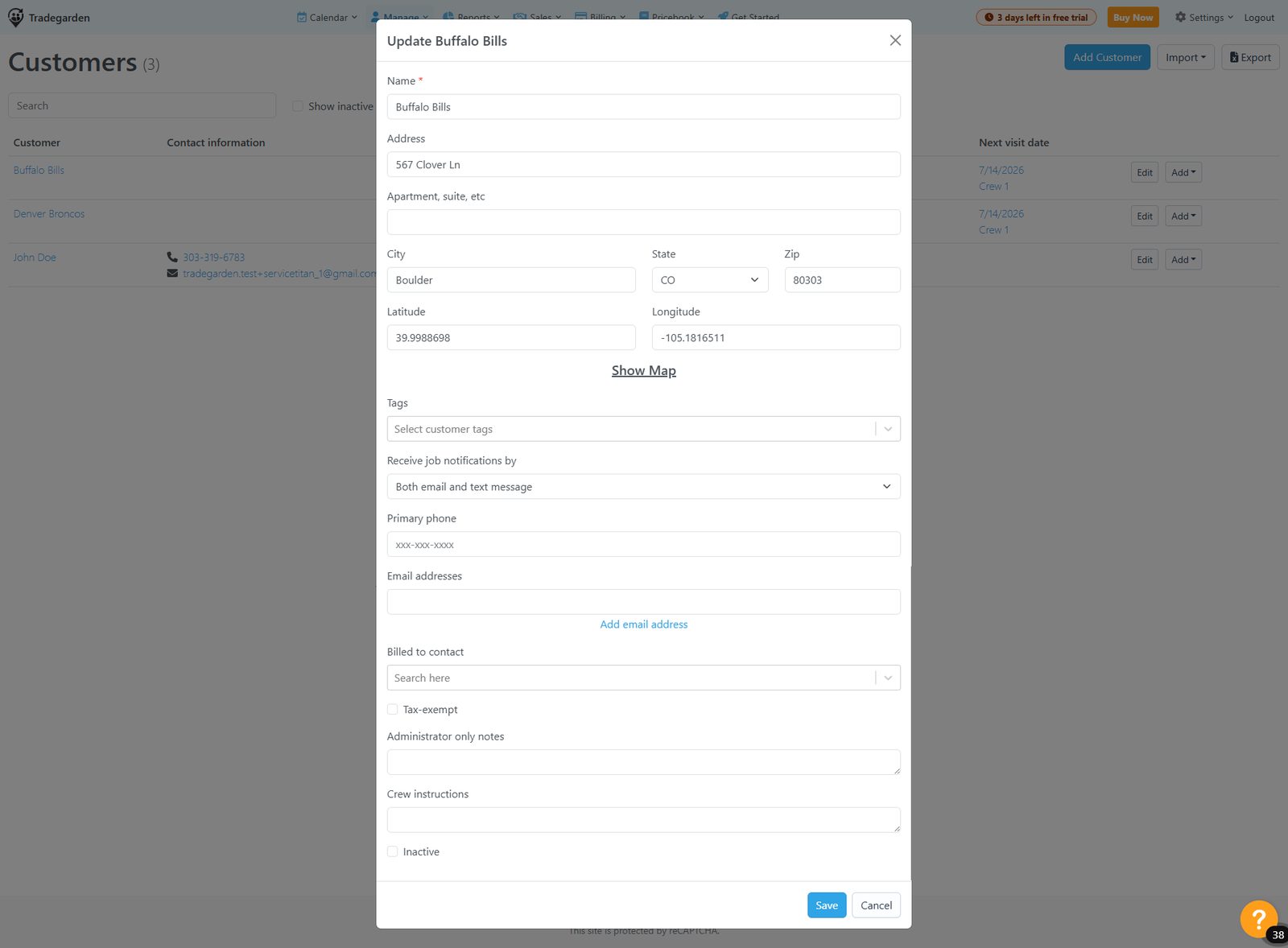
Crew Control covers basic customer records tied to jobs and billing, but customer management stays lightweight — no multi-address model, unified timeline, tags, or duplicate detection in our testing.
No dedicated Add Customer screenshot captured for Crew Control. Customer records exist (seen in billing/invoice screenshots) but the creation form was not screenshotted. Field depth appears limited based on what surfaces in other views. [Research-based; no creation-form screenshot available]
Crew Control customer editing not directly screenshotted. Invoice and billing screenshots show customer names but no customer edit form was captured. Based on the platform's simpler UX pattern, editing is likely functional but less feature-rich than SF. [Research-based; no edit-form screenshot available]
Customer records visible only indirectly through billing/invoice views. No dedicated customer detail screenshot captured. The platform's lightweight design suggests basic contact/address fields without the depth of SF's tabbed structure. [Research-based; limited screenshot evidence]
No multi-address screenshot for Crew Control. The platform is designed primarily for crew/route scheduling and does not appear to emphasize multi-property customer management based on available screenshots. [Research-based; no supporting screenshot]
No customer history/timeline screenshot captured for Crew Control. The billing section shows paid/unpaid invoice lists which provide some history, but a unified customer timeline does not appear to exist based on platform design. [Research-based; no screenshot evidence]
No tags or custom fields screenshot captured for Crew Control. The platform's lightweight design suggests limited segmentation capability. [Research-based; no screenshot evidence]
No dedicated notes/attachments screenshot for Crew Control. Invoice screenshots show no notes panel. Notes likely exist at the job level but may not be prominent at the customer record level based on platform design. [Research-based; no supporting screenshot]
No duplicate detection screenshot for Crew Control. No evidence of duplicate warning functionality in any of the captured screenshots. [Research-based; no screenshot evidence — assumed similar to or weaker than HCP/Workiz which had no detection]
Estimates and price book
Read moreCrew Control's price book supports nested categories, product groups, and tiered markup tables — stronger than expected for a lightweight tool — but estimates lack Good/Better/Best options and e-signatures.
Estimates and price book
Read more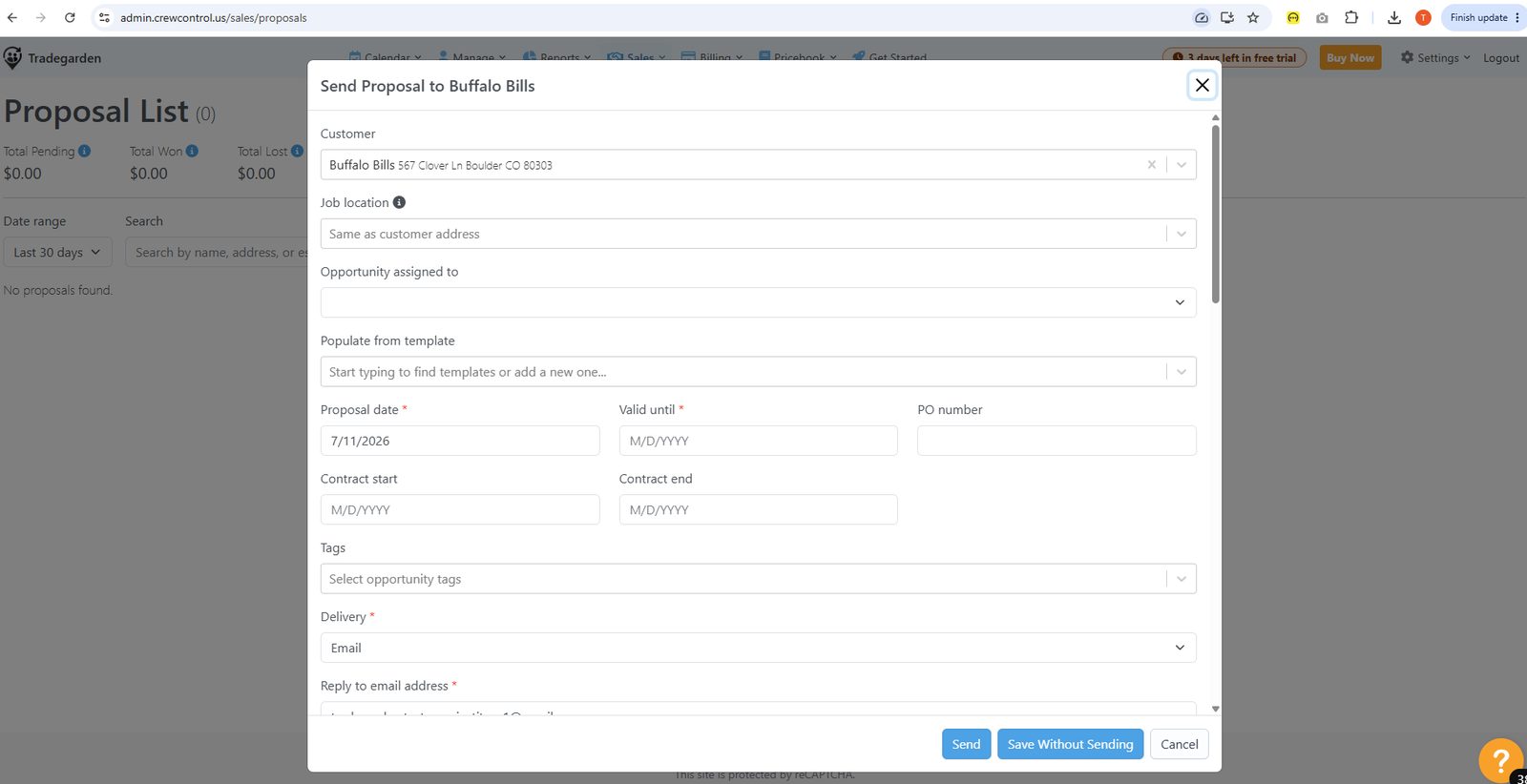
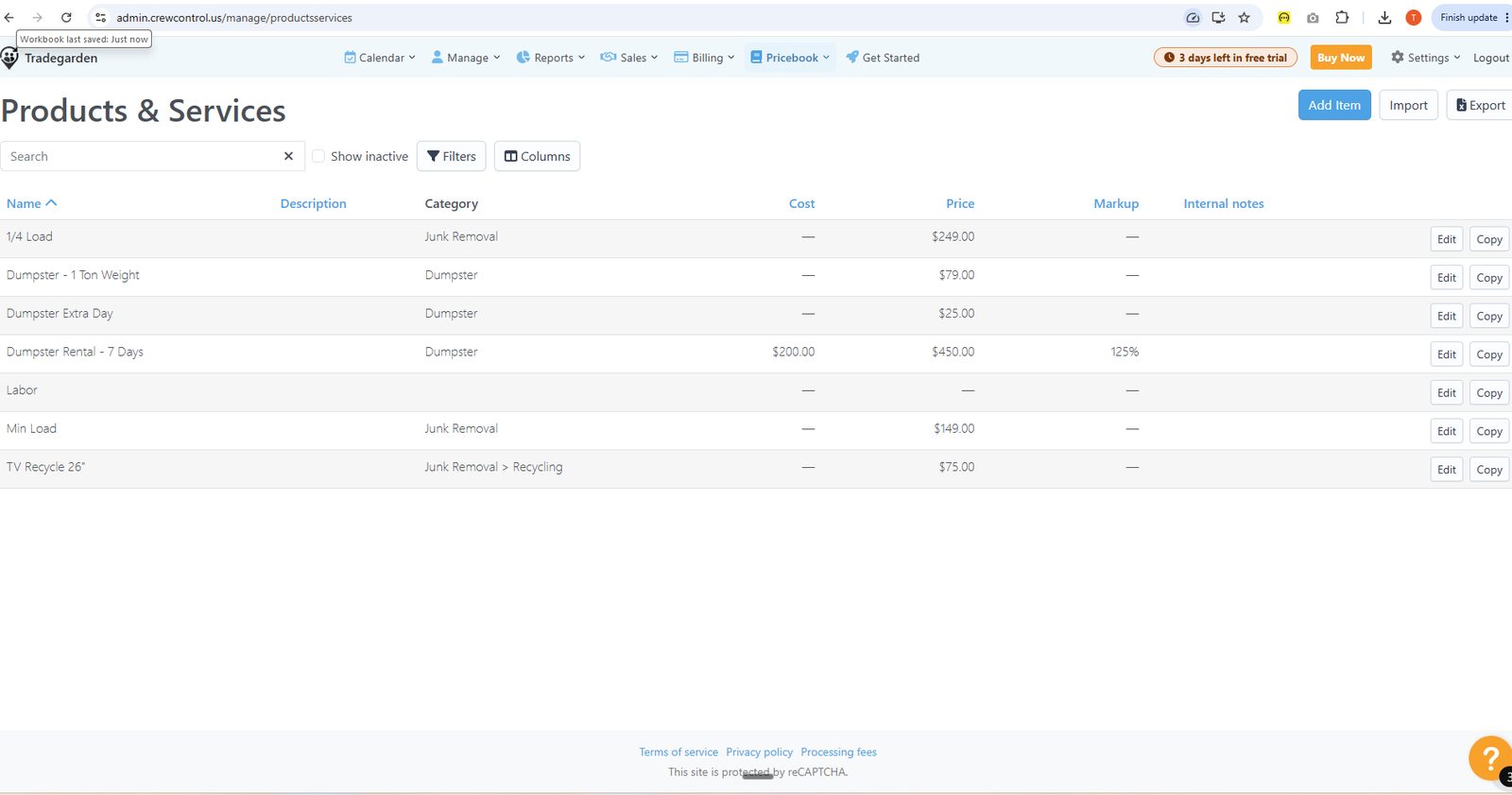
Crew Control's price book supports nested categories, product groups, and tiered markup tables — stronger than expected for a lightweight tool — but estimates lack Good/Better/Best options and e-signatures.
Crew Control estimate creation not directly screenshotted. Billing section shows 'Work Not Invoiced' and 'Drafts' tabs suggesting estimates/proposals exist, but the creation flow was not captured. [Research-based; no estimate creation screenshot]
No estimate edit screenshot for Crew Control. [Research-based; no screenshot evidence]
No Good/Better/Best screenshot for Crew Control. Not confirmed in available screenshots. [Research-based; no screenshot evidence]
Crew Control pricebook screenshots confirm products and services exist and can be added to jobs/invoices (Add Item modal shows Name, Type, Category, Price, Cost, Markup%). Catalog is accessible but the pull-into-estimate flow was not directly screenshotted. [Primarily screenshot-based for catalog; research-based for estimate pull flow]
No e-signature or customer approval screenshot for Crew Control. [Research-based; no screenshot evidence]
No estimate-to-job conversion screenshot for Crew Control. Billing flow shows Work Not Invoiced → Invoice creation suggesting jobs feed invoices, but the estimate-to-job step was not captured. [Research-based; no screenshot evidence]
Add Item screenshot confirms: Name, Description, Type, Category, Price, Cost, Markup%, Taxable, Part#, Internal notes, Image upload. Clean and functional but fewer fields than SF. Product Groups (bundles) are a separate section with their own Add Group flow. [Screenshot-based]
Crew Control Markup Tables screenshot confirms tiered markup by cost range ($0.01-$100 = 150%, $100.01-$500 = 100%, $500.01-$1M = 50%). Product Groups provide flat-rate bundling. T&M vs flat rate distinction not explicitly confirmed in screenshots. [Screenshot-based for markup; research-based for T&M toggle]
Invoicing and payments
Read moreCrew Control handles invoicing through Work Not Invoiced and paid/unpaid queues with audit trails, but payment collection in the field and invoice branding options are limited compared with Jobber or Housecall Pro.
Invoicing and payments
Read more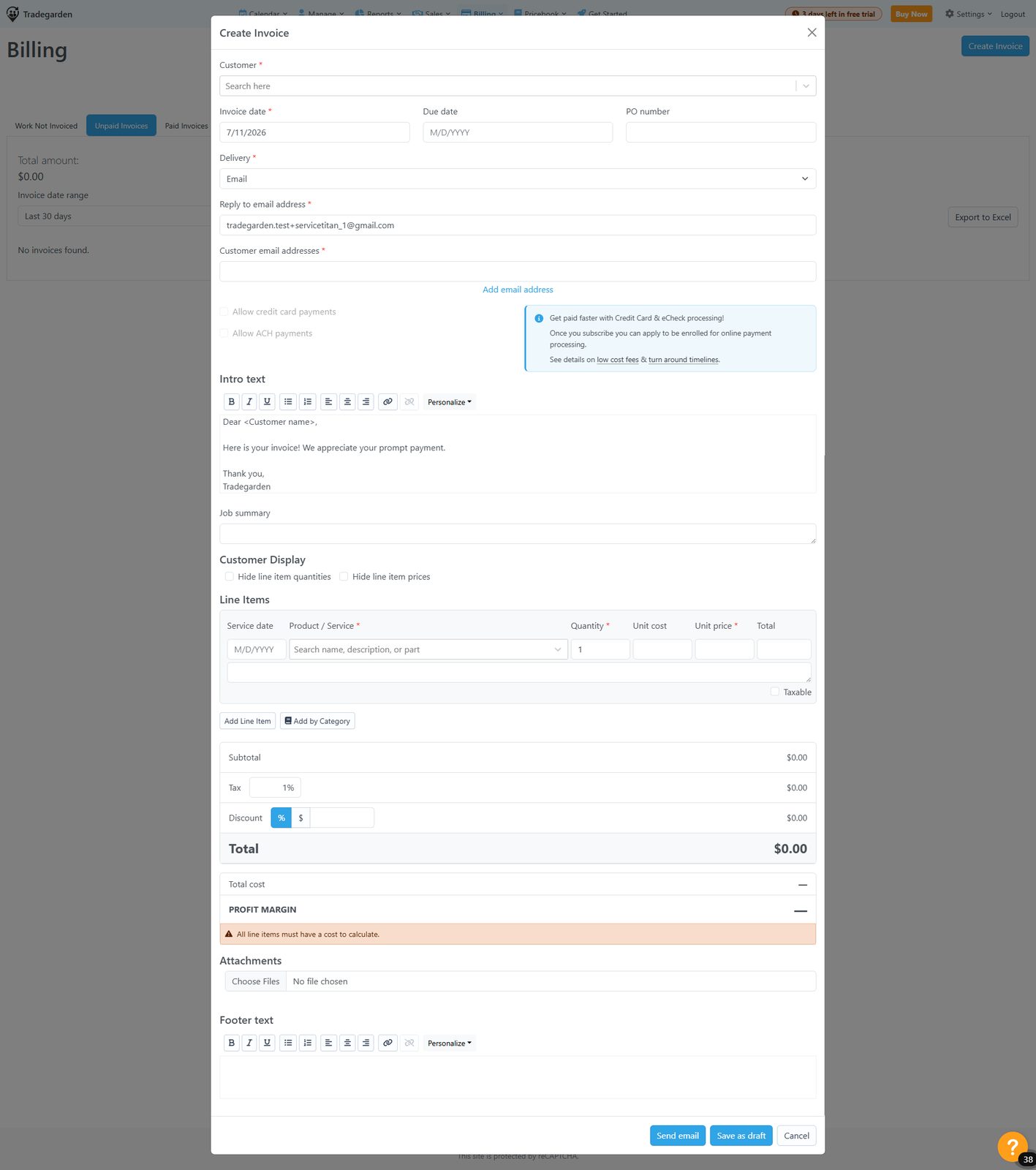
Crew Control handles invoicing through Work Not Invoiced and paid/unpaid queues with audit trails, but payment collection in the field and invoice branding options are limited compared with Jobber or Housecall Pro.
Billing section screenshots show Work Not Invoiced, Drafts, Unpaid Invoices, Paid Invoices tabs. 'Create Invoice' button visible. Paid invoice list shows Invoice#, Customer, Date, Amount. Invoice creation form was not directly screenshotted but workflow is confirmed. [Screenshot-based for billing dashboard; research-based for creation form]
Paid Invoices screenshot confirms Actions menu: Edit payment, Clear payment details, Resend receipt, Edit invoice, View, Print, Audit. Clear payment details returns invoice to unpaid. Edit invoice confirmed. Audit trail available. [Screenshot-based]
No invoice branding/customization screenshot for Crew Control. Invoice views in the billing section show basic list format. Based on platform research, customization options are limited. [Research-based; no screenshot evidence]
Crew Control billing shows 'Work Not Invoiced' tab — a queue of uninvoiced work. 'Create Invoice' button available. This is a semi-automated pull from completed work rather than a true auto-invoice trigger. [Screenshot-based]
No deposit/progress billing screenshot for Crew Control. [Research-based; no screenshot evidence]
No tax handling screenshot for Crew Control. Taxable field confirmed on the Add Item form (checkbox). [Partially screenshot-based; no tax setup or multi-jurisdiction evidence]
Communication screenshot confirms email + SMS notification panel from calendar. Template selector with phone number field visible. Email notifications included in all plans; SMS requires Plus plan. [Screenshot-based]
Crew Control payment flow confirmed via Paid Invoices screenshot showing invoice with 'Payment details' and 'Date paid' fields. Payment recording confirmed but the payment entry form itself was not captured. [Partially screenshot-based; payment form not captured]
Mobile app
Read moreCrew Control runs entirely in the mobile browser — no native app and no offline mode — though job creation, crew assignment, and billing navigation are functional for office-first teams.
Mobile app
Read more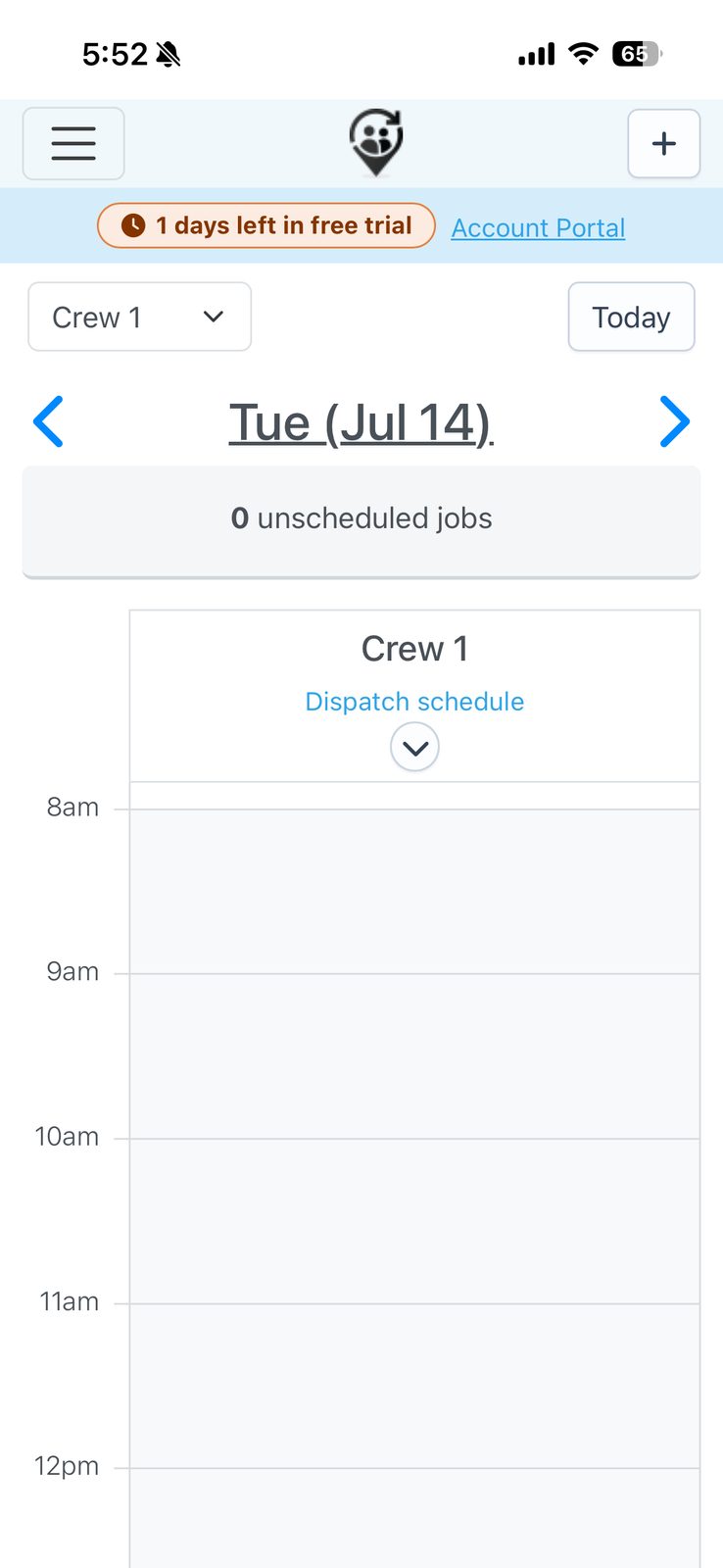
Crew Control runs entirely in the mobile browser — no native app and no offline mode — though job creation, crew assignment, and billing navigation are functional for office-first teams.
Screenshots confirm a web-app-in-browser mobile experience (not a native app) accessible from a phone. Add Single Job form is visible: Customer search/select, + Add new customer link, Crew selector, Date picker (calendar grid), Start/End time, Arrival window, Service categories, Crew instructions, Checklist, and Line Items. Update Job form shows same fields. Customer list with search and Add Customer are confirmed. Proposal creation form also visible. Functional but the browser-based interface means no native gestures, slower load, and less polished than a native app. The lack of a dedicated native mobile app is a meaningful limitation for field workers. [Screenshot-based]
Job detail visible indirectly through the Dispatch Schedule and Update Job screens. Jobs appear on the calendar view as time-blocked entries with customer name and time window. Tapping a job shows a context menu with options: Details, Edit, Move, Skip, Copy, Audit, Message, Remove, Extend — a solid set of field actions. Update Job form shows Customer, Job location, Schedule, Crew, Checklist, Attachments, Billing information (PO Number, billing method, Amount, Line Items). Reasonably comprehensive but all within a browser view rather than a native screen. No tabbed detail layout, no embedded map, no quick-pay or clock-in shortcut at the top of the job detail. [Screenshot-based]
Crew Control is a browser-based mobile experience, which means it has no offline mode by design — a browser-rendered app cannot function without an internet connection. No offline capability was confirmed or implied in any screenshots. This is a fundamental limitation of the web-app approach vs. a native mobile app. [Screenshot-based inference; browser-based apps inherently require connectivity]
Attachments section confirmed within the Update Job form: 'Choose Files no files selected' — standard browser file picker for attaching photos/documents. Functional but relies on the browser's native file picker rather than a dedicated camera shortcut or native photo experience. No dedicated photos tab or media gallery visible. The browser file picker works but provides a less streamlined field experience than a native photo-capture flow. [Screenshot-based]
No time tracking or clock in/out screenshot captured for Crew Control mobile. Time tracking is not evident in any of the mobile screenshots available. The browser-based interface suggests time tracking would require navigating to a specific page rather than having a persistent clock-in prompt. Crew Control's primary focus is scheduling/dispatch for crews rather than individual tech time tracking. [Research-based; no screenshot evidence]
Billing section confirmed in Crew Control mobile showing Work Not Invoiced, Unpaid Invoices, Paid Invoices tabs and a Create Invoice button — invoicing is accessible from mobile. However, no payment capture, card reader, or signature flow was screenshotted. The billing section is browser-based. No tap-to-pay, card reader pairing, or signature pad screen was captured. Basic invoice management is accessible but payment collection capability not confirmed from screenshots. [Screenshot-based for billing navigation; research-based for payment capture]
No map or navigation screenshot captured for Crew Control mobile. The Dispatch Schedule view shows jobs in a time-based calendar format with customer name and address visible as text, but no map view, pin cluster, or navigation hand-off was captured. The browser-based interface would rely entirely on tapping an address to open the default maps app — functional but not a built-in map experience. [Research-based; no screenshot evidence of navigation features]
Crew Control's mobile experience is entirely browser-based — all screenshots show a web app rendered in a mobile browser (visible browser chrome, web-style UI, non-native controls). Browser-based apps are inherently slower and less stable than native apps: dependent on network connectivity, subject to browser memory limits, no push notification reliability, and no offline resilience. The screenshots themselves show a functional but visually unsophisticated interface. For field workers in areas with spotty connectivity, a browser-only approach is a significant reliability risk. [Screenshot-based — browser-based nature directly confirmed]
Reporting & Analytics
Read moreCrew Control earns praise for customizable reports on crew productivity and job profitability with Excel export — a standout for a lightweight scheduler, though visual KPI dashboards are not a separate module.
Reporting & Analytics
Read more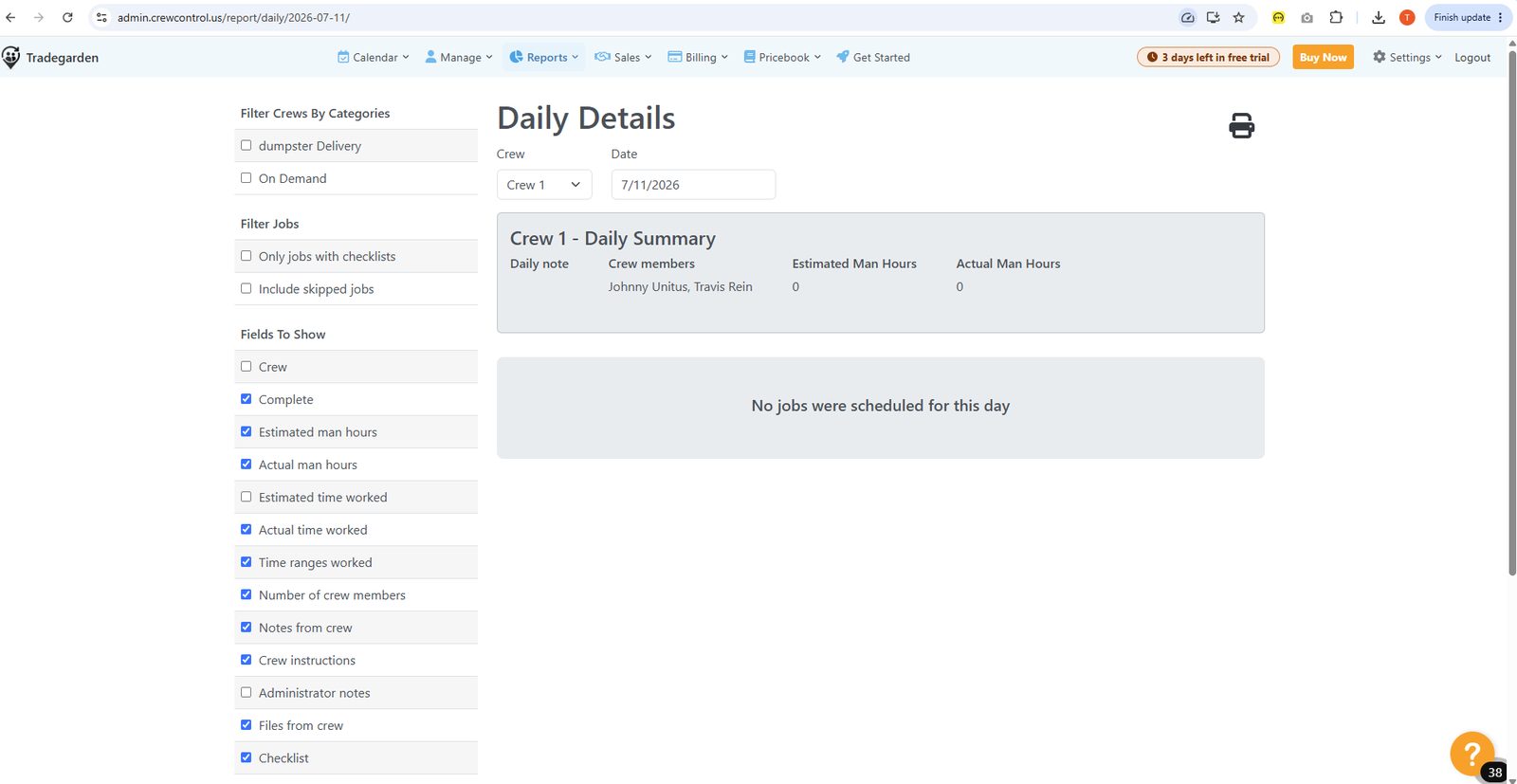
Crew Control earns praise for customizable reports on crew productivity and job profitability with Excel export — a standout for a lightweight scheduler, though visual KPI dashboards are not a separate module.
Users specifically praise "great reporting capability" with customizable reports on job profitability and crew productivity, plus Excel export. [Research-based: vendor docs + Capterra/G2/comparison reviews; not directly confirmed via screenshots.] Source: Aspire Crew Control product page (youraspire.com); Capterra & SoftwareAdvice Crew Control reviews.
Customizable Reports with "unlimited filtering and field options" are named in independent product research, suggesting real report-building flexibility for a lightweight tool. [Research-based: vendor docs + Capterra/G2/comparison reviews; not directly confirmed via screenshots.] Source: Aspire Crew Control product page (youraspire.com); Capterra & SoftwareAdvice Crew Control reviews.
No dedicated visual KPI-dashboard feature was found beyond the customizable reports module. [Research-based: vendor docs + Capterra/G2/comparison reviews; not directly confirmed via screenshots.] Source: Aspire Crew Control product page (youraspire.com); Capterra & SoftwareAdvice Crew Control reviews.
A Capterra reviewer specifically calls out being able to "export data into excel" as a benefit. [Research-based: vendor docs + Capterra/G2/comparison reviews; not directly confirmed via screenshots.] Source: Aspire Crew Control product page (youraspire.com); Capterra & SoftwareAdvice Crew Control reviews.
Mobile Time Entry & Tracking is an explicitly named feature, and users specifically praise employee time tracking and reporting. [Research-based: vendor docs + Capterra/G2/comparison reviews; not directly confirmed via screenshots.] Source: Aspire Crew Control product page (youraspire.com); Capterra & SoftwareAdvice Crew Control reviews.
A "profit value tracker" on invoicing/proposals and visibility into crew efficiency and customer profitability are confirmed native features. [Research-based: vendor docs + Capterra/G2/comparison reviews; not directly confirmed via screenshots.] Source: Aspire Crew Control product page (youraspire.com); Capterra & SoftwareAdvice Crew Control reviews.
Time tracking data feeds payroll and billing, but no dedicated commission-tracking feature was found documented beyond QuickBooks sync. [Research-based: vendor docs + Capterra/G2/comparison reviews; not directly confirmed via screenshots.] Source: Aspire Crew Control product page (youraspire.com); Capterra & SoftwareAdvice Crew Control reviews.
Marketing and communication
Read moreCrew Control covers operational SMS and email reminders plus on-the-way notifications, but native review campaigns, marketing blasts, and two-way conversational texting are not part of the product.
Marketing and communication
Read more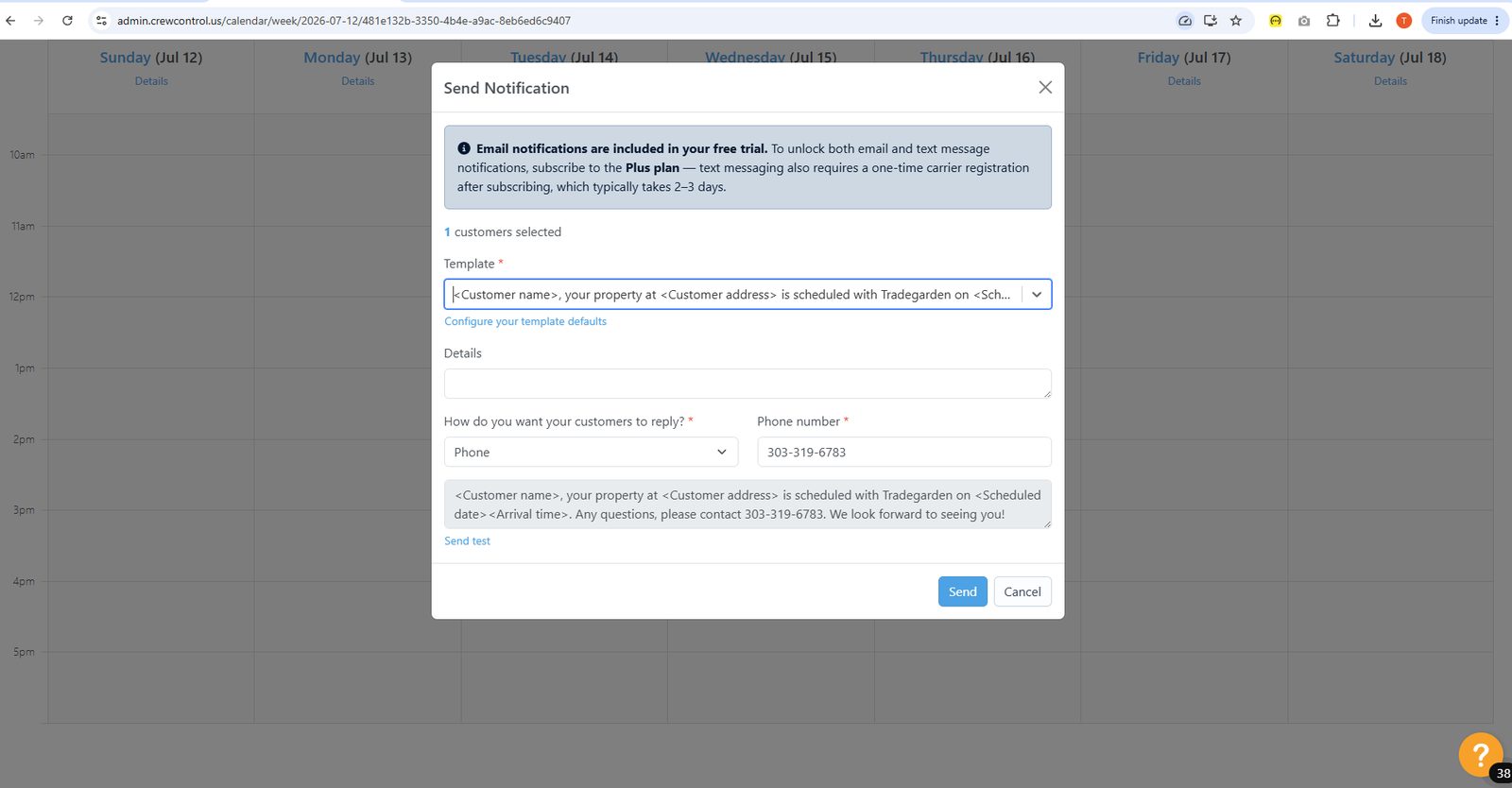
Crew Control covers operational SMS and email reminders plus on-the-way notifications, but native review campaigns, marketing blasts, and two-way conversational texting are not part of the product.
No native review-generation tooling was found for this product. [Research-based: vendor docs + Capterra/G2/comparison reviews; not directly confirmed via screenshots.] Source: Aspire Crew Control product page (youraspire.com); Capterra & SoftwareAdvice Crew Control reviews.
A Capterra reviewer explicitly requested "an ability to send out marketing blast emails," noting Crew Control does not currently offer this. [Research-based: vendor docs + Capterra/G2/comparison reviews; not directly confirmed via screenshots.] Source: Aspire Crew Control product page (youraspire.com); Capterra & SoftwareAdvice Crew Control reviews.
Lead-source tracking is not documented; Crew Control is positioned as a scheduling/dispatch and billing tool, not a marketing CRM. [Research-based: vendor docs + Capterra/G2/comparison reviews; not directly confirmed via screenshots.] Source: Aspire Crew Control product page (youraspire.com); Capterra & SoftwareAdvice Crew Control reviews.
No call-tracking capability was found documented for Crew Control. [Research-based: vendor docs + Capterra/G2/comparison reviews; not directly confirmed via screenshots.] Source: Aspire Crew Control product page (youraspire.com); Capterra & SoftwareAdvice Crew Control reviews.
Automatic service reminders and text-based on-the-way notices are repeatedly highlighted as a core, native Crew Control feature. [Research-based: vendor docs + Capterra/G2/comparison reviews; not directly confirmed via screenshots.] Source: Aspire Crew Control product page (youraspire.com); Capterra & SoftwareAdvice Crew Control reviews.
Customer texting is largely one-way automated notification (with opt-in/opt-out) rather than a full two-way conversational messaging system. [Research-based: vendor docs + Capterra/G2/comparison reviews; not directly confirmed via screenshots.] Source: Aspire Crew Control product page (youraspire.com); Capterra & SoftwareAdvice Crew Control reviews.
Proposal/invoice templates can be sent by text or email, but a reviewer specifically asked for more customization options for text and email templates, suggesting limited depth. [Research-based: vendor docs + Capterra/G2/comparison reviews; not directly confirmed via screenshots.] Source: Aspire Crew Control product page (youraspire.com); Capterra & SoftwareAdvice Crew Control reviews.
No review-request or reputation-management feature was found documented for Crew Control. [Research-based: vendor docs + Capterra/G2/comparison reviews; not directly confirmed via screenshots.] Source: Aspire Crew Control product page (youraspire.com); Capterra & SoftwareAdvice Crew Control reviews.
Integrations
Customer Support
Channels
Phone, email, knowledge base
Hours
Not publicly listed
Avg Response
Varies by plan and issue complexity