
Housecall Pro is the automation-first choice for residential trades. The strongest built-in marketing, review management, and financing tools of the group — but top-bar navigation adds clicks vs. sidebar competitors. We tested 95 individual elements across onboarding, CRM, scheduling, dispatch, estimates, invoicing, payments, communication, reporting, mobile use, pricing, and support. Housecall Pro earned a TradeGarden score of 8.1/10.
Housecall Pro
Trade Categories
Software Categories
Affiliate disclosure: Some links on this page are affiliate links. We earn a commission at no cost to you. This never influences our rankings. Read our methodology.
Quick Verdict
Housecall Pro is the automation-first choice for residential trades. The strongest built-in marketing, review management, and financing tools of the group. The navigation is not as straight forward as other options.
What We Like
- Best automation for reminders, follow-ups, and review requests
- Native Google + Facebook review management — no add-on needed
- Live technician tracking with customer-facing ETA link
- Explicit Good/Better/Best estimate options with customer approval logic
- Most complete consumer financing story: Wisetack + Klarna
What Could Improve
- Top-bar navigation (no persistent sidebar) not as intuative as sidebar competitors
- No duplicate customer detection — created silent duplicates in testing
- Price book felt hardest of the three to actually use in practice
- Separate add-on app for time tracking; clock-notification reliability complaints noted
- Lighthouse performance score of 20 — lowest web app speed of all products tested
How We Tested Housecall Pro
We evaluated Housecall Pro using the same TradeGarden rubric applied to every field service platform — 95 scored elements across scheduling, CRM, invoicing, mobile, and support, tested hands-on in live accounts rather than from marketing materials.
Each item was scored through our hands-on pass and cross-checked against an independent AI-assisted pass, with manual audits wherever the two diverged. Read our full methodology.
Last tested: July 22, 2026
Pricing
Basic
$79/month
1 user · billed monthly
Additional user licenses change this price
- Scheduling and dispatching
- Quotes and proposals
- Invoices and payments
- Online booking
- Premium review management
- Job cost tracking
- Price book
- Customer communication
Best Value!
Essentials
$189/month
1 user · billed monthly
Additional user licenses change this price
- All Basic features, plus:
- QuickBooks Online and Desktop
- Flat-rate pricing
- Customer equipment tracking
- Photo annotations
- Commissions
- Employee GPS tracking
- Checklists
Most Popular
MAX
$329/month
1 user · billed monthly
Additional user licenses change this price
- All Essentials features, plus:
- Advanced custom reporting
- Dedicated onboarding specialist
- Prioritized phone support
- Sales Proposal Tool
- Recurring Service Plans
Prices shown are for a single user. Multiple-user licenses change the monthly cost.
Pricing verified July 2026. Housecall Pro updates pricing periodically.
Who Should Use This Software?
Great For
- High-volume residential trades (HVAC, plumbing, electrical) focused on marketing ROI
- Shops where review generation and Google Ads need to run with minimal manual effort
- Businesses where consumer financing is a frequent job-closing tool
- Teams needing the strongest built-in SMS and appointment automation
Consider Alternatives If…
- You need a persistent sidebar and fewer clicks for high-volume dispatch → Jobber or Workiz
- Your team manages multi-site commercial accounts → Jobber (named property model)
- You need fleet GPS and advanced dispatch tools → Service Fusion
- You need a fully offline-capable mobile app → Jobber
Not Ideal For
- Businesses managing complex commercial accounts with multiple named properties
- Teams where the top-bar navigation (no persistent sidebar) creates friction at scale
- Operations needing deep inventory/parts management
- Users who need a fully reliable offline mobile experience
FAQs
How much does Housecall Pro actually cost per month?
Housecall Pro lists Basic at $79/mo (1 user), Essentials at $189/mo (1 user), and MAX at $329/mo (1 user) at standard pricing — we verified these in-product in July 2026. Promotional first-month discounts may appear at checkout. Card processing runs 2.59% + $0.30 per card transaction per Housecall Pro's published rates.
How does Housecall Pro compare to Jobber and Workiz?
Housecall Pro leads on built-in marketing automation, review management, and consumer financing (Wisetack + Klarna). Jobber wins on UI polish, commercial property management, and mobile stability. Workiz stands out for call-heavy, on-demand trades with its built-in phone system. Housecall Pro's top-bar navigation adds clicks compared with sidebar-first competitors.
Does Housecall Pro offer a free plan or free trial?
Yes — Housecall Pro offers a 14-day free trial with no credit card required. Use the trial to test automated follow-ups, review requests, and the customer portal before subscribing.
Does Housecall Pro integrate with QuickBooks?
Yes. Essentials and above include QuickBooks Online and QuickBooks Desktop sync. We also confirmed integrations with Google Local Services Ads, Thumbtack, Zapier, and Profit Rhino.
What types of businesses is Housecall Pro best for?
Housecall Pro fits high-volume residential trades — HVAC, plumbing, electrical, and similar home service businesses — that want marketing automation, review generation, and financing tools built in rather than bolted on.
Product Details
Scheduling and dispatch
Read moreSingle well-built form: live map photo, price-book line items (services/materials), schedule panel with anytime toggle, notify-customer checkbox, collapsible checklists/attachments/fields.
Scheduling and dispatch
Read more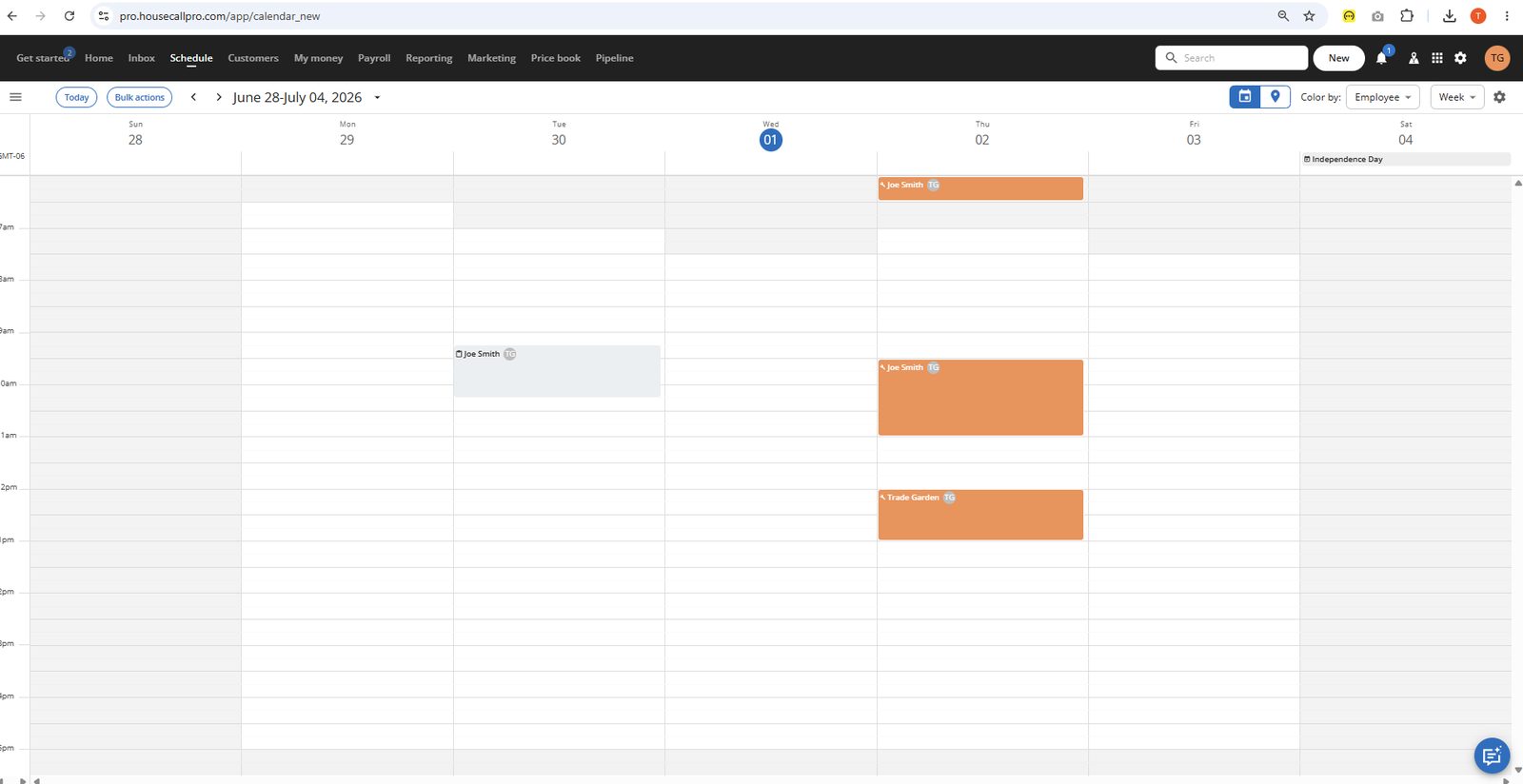
Single well-built form: live map photo, price-book line items (services/materials), schedule panel with anytime toggle, notify-customer checkbox, collapsible checklists/attachments/fields.
Single well-built form: live map photo, price-book line items (services/materials), schedule panel with anytime toggle, notify-customer checkbox, collapsible checklists/attachments/fields. Missing a distinct recurring toggle on this screen.
Easily performs drag and drop with a visual ability to slide the length of a service. Can easily move to a different date. On click of box, can easily modify the job or edit. Its annoying that you have to hit save after doing the drag and drop. I get that it can cause issues with accidntal drag and drop but its not intuatives so I keep dragging an item around even though I don't have it clicked anymore. Uses a left sidebar to modify the job.
Day, Week, Month confirmed, plus a distinct map/location pin toggle next to the calendar icon (paired with "Color by: Area" and zip-code area assignment) - geographic view appears supported though not opened in screenshots.
They do have a new feature as a recurring job. However, it is still listed as a separate selection from a one time job. This should just be a check box within a job to do this.
There is a fixed arrival window created at the settings level and appreared to apply to all jobs. Could not be set at a job type or individual job level
Edit team field with one removable tag shown - same pattern as Jobber, multi-tech implied via dropdown but not shown populated with more than one. Icon within each job on schedule shoing initials of crew member. Must click in to change crew with a dropdown. Could not assigne to a crew. Somewhat difficult to change technicials from schedule view. there was a mouseover version where it opened up a sidebar to change crew but if you clicked into the job I couldn' not change crew.
Color by: Employee / Area options confirmed. Job changes to grey once completed and puts a red box around job if no payment.
Client management
Read moreModal form: name, display name, company, mobile/home/work phone, email, role, Homeowner/Business toggle, "Mark as Do not service" checkbox, address with live map preview, address notes, "+ Address", customer notes, tags, bills-to, lead source, referred by, send notifications.
Client management
Read more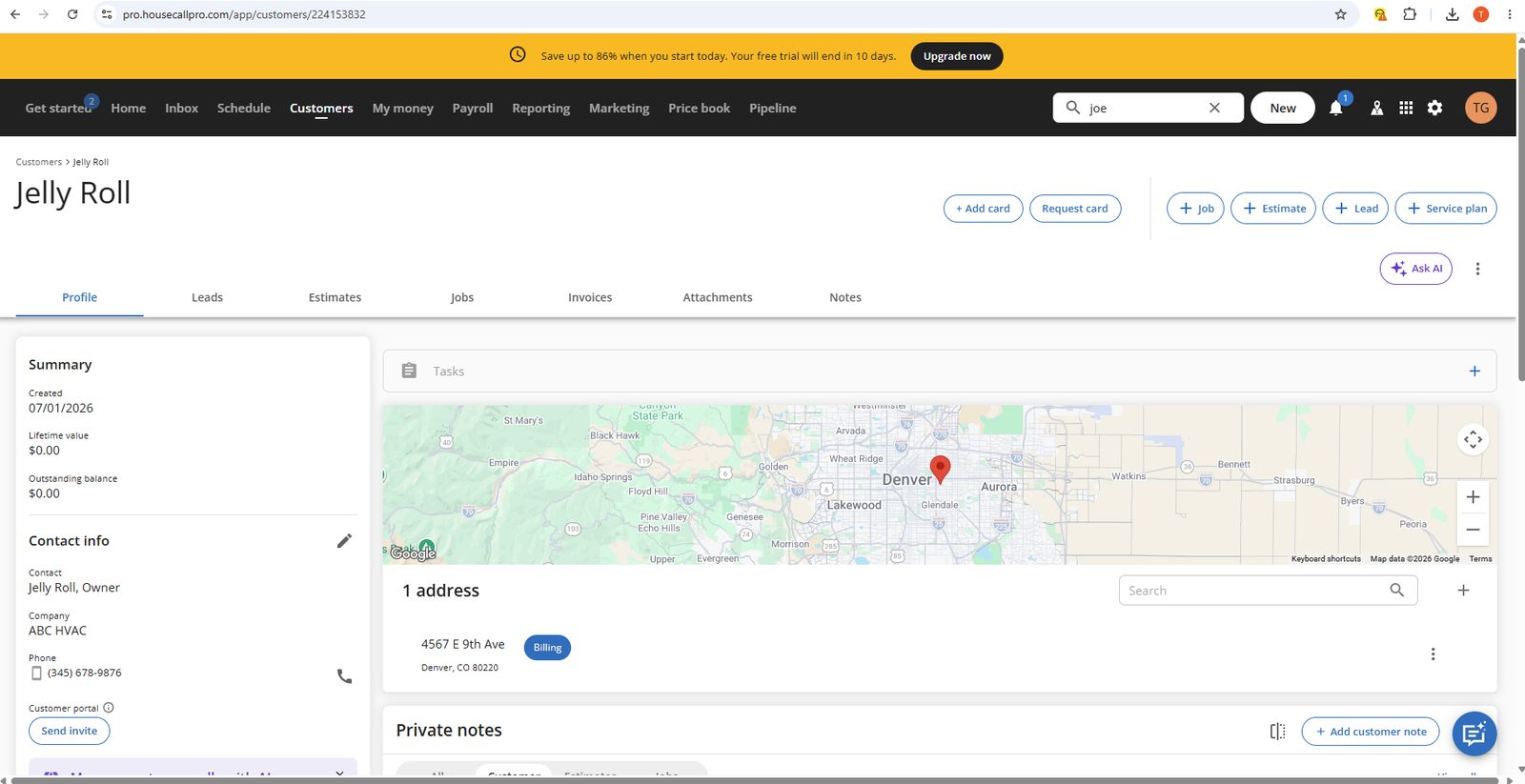
Modal form: name, display name, company, mobile/home/work phone, email, role, Homeowner/Business toggle, "Mark as Do not service" checkbox, address with live map preview, address notes, "+ Address", customer notes, tags, bills-to, lead source, referred by, send notifications.
Modal form: name, display name, company, mobile/home/work phone, email, role, Homeowner/Business toggle, "Mark as Do not service" checkbox, address with live map preview, address notes, "+ Address", customer notes, tags, bills-to, lead source, referred by, send notifications. Live map as you type is a strong trust signal.
Edit pencil on Contact info. Tabbed structure means most updates are one click. Quick-create buttons (+Job, +Estimate, +Lead, +Service plan, Ask AI) live on the record header for fast actions.
Summary (created, lifetime value, balance), Contact info, address with interactive map, Private notes, Activity feed. Tabs: Leads, Estimates, Jobs, Invoices, Attachments, Notes. "Ask AI" on header. Customer portal invite directly actionable from the record. Activity feed is a true chronological stream.
+ Address on form and record. Label badges (e.g. "Billing") on each address. Interactive map per address. No named property model — no property-level name, contacts, or tax rate. Functional but less structured than Jobber for multi-site accounts.
Activity feed on Profile tab is a true chronological stream of all activity. Separate tabs for deep-dives. Private notes inline on Profile. Best history UX — unified timeline plus dedicated filtered tabs.
Tags inline on create form and record (green chips, press enter). Always visible. Lead source and referral add segmentation depth. No custom fields confirmed from screenshots.
Dedicated Notes tab + dedicated Attachments tab — both first-class. Private notes also inline on Profile with author/timestamp. Two notes surfaces gives flexibility. Attachments as a named tab signals real file management.
Did no detect duplicates — "jelly Roll" and "Jelly Roll" both created silently as separate records. No warning triggered, no merge option visible. Real data quality risk at scale. I have the setting turned on in settings to prevent this but it didn't catch it.
Estimates and price book
Read moreMost feature-rich builder: live property photo/map preview, schedule panel, price book links, and a running Cost breakdown/Profit-Loss calculation as you build.
Estimates and price book
Read more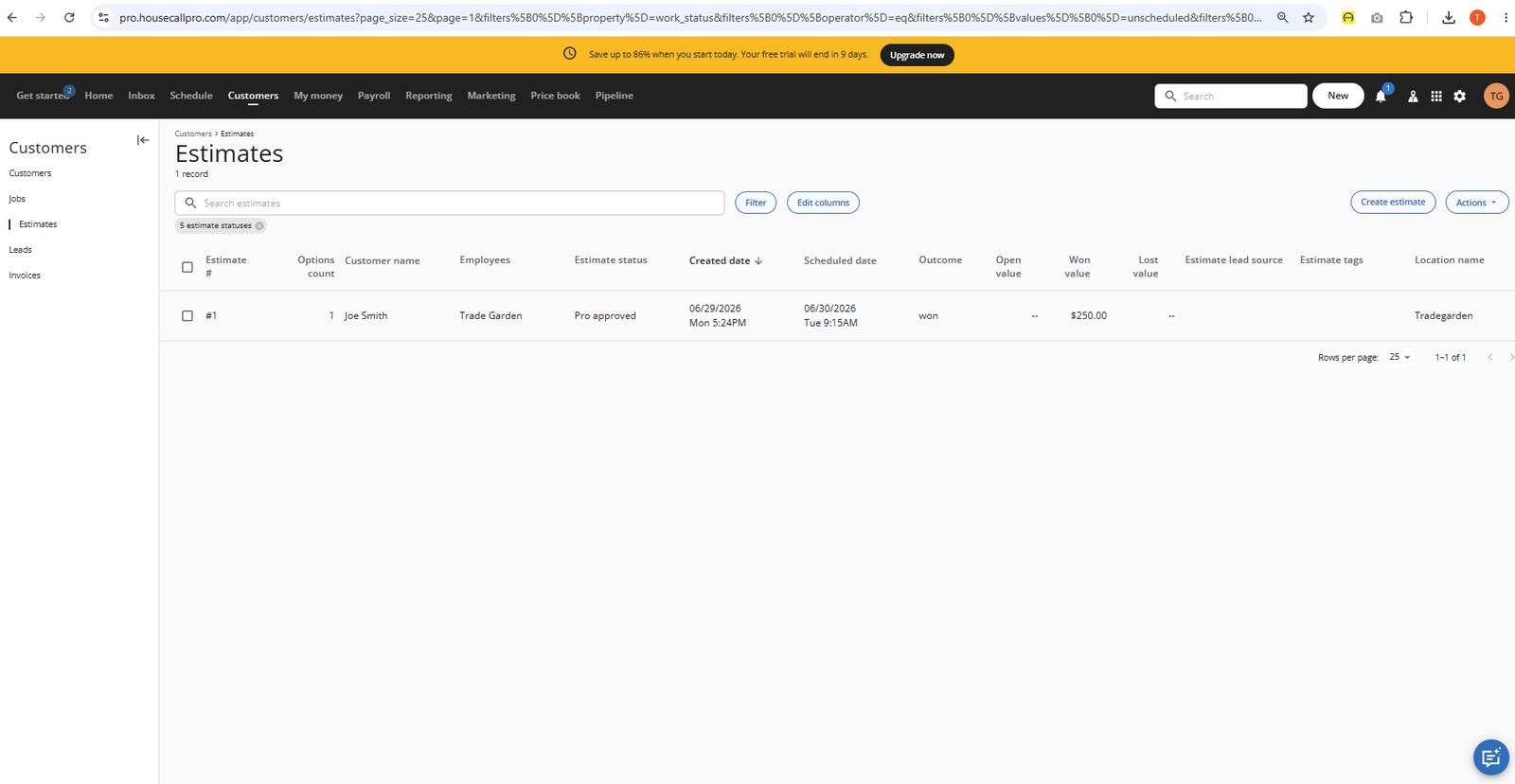
Most feature-rich builder: live property photo/map preview, schedule panel, price book links, and a running Cost breakdown/Profit-Loss calculation as you build.
Most feature-rich builder: live property photo/map preview, schedule panel, price book links, and a running Cost breakdown/Profit-Loss calculation as you build.
Unique visual pipeline stepper (Schedule -> OMW -> Finish -> Send -> Approval -> Copy to Job) makes estimate status/progress very clear while editing.
Clearest implementation: explicit Option #1/#2/Add option tabs, a "Customer can approve: Only one option" setting, and a customer-facing Send/Present view showing both options side-by-side with pricing and "See details."
Price Book links (Service/Material) are present and functional, but per tester's testing this was the hardest of the three to actually pull items from - flagged as cumbersome.
Full Send/Present customer view with option comparison and pricing, tied to an explicit Approval stage in the pipeline - most complete customer-facing approval experience.
Copy to Job is a formal, visible step in the estimate pipeline stepper - clearly built into the core workflow.
Item creation wasn't directly captured, but the deep category/service structure and dedicated Labor Rates and Materials Markup settings imply a robust underlying item model. While it offers the most flexibility it is also by far the most complicated with a complicated UI that wasn't straight forward.
Clearly confirmed: a dedicated Labor Rates page (Hourly cost / Hourly price / "Default flat rate" per rate) plus a Service Price Adjuster that explicitly separates "manually priced services" from "Flat rate enabled" services.
Invoicing and payments
Read moreSimilar builder depth, plus a dedicated 3-step Invoicing Setup wizard (Design -> Preview -> Send) for first-time logo/message personalization - nice onboarding touch.
Invoicing and payments
Read more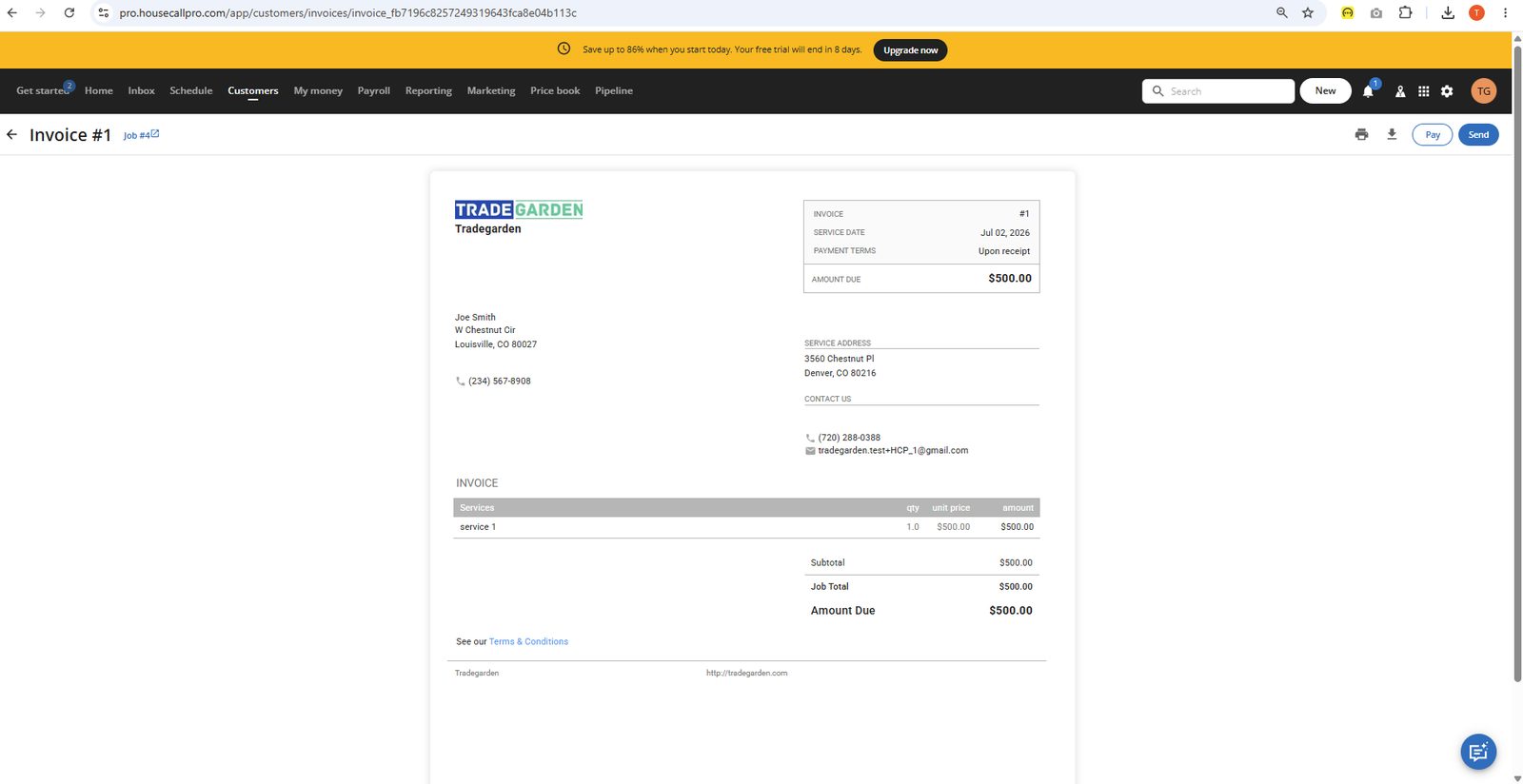
Similar builder depth, plus a dedicated 3-step Invoicing Setup wizard (Design -> Preview -> Send) for first-time logo/message personalization - nice onboarding touch.
Similar builder depth, plus a dedicated 3-step Invoicing Setup wizard (Design -> Preview -> Send) for first-time logo/message personalization - nice onboarding touch.
Editable via the Send Invoice flow with expandable Job/Business/Services/Materials sections; solid but slightly less action-dense than Jobber's menu.
Strong template customization: toggle Job number/Invoice number/Service date/Summary of work, choose Email-optimized vs. Envelope-optimized layout, plus a full default template preview showing Discount, Tax (named/rated), and Tip lines.
"Automatic payments" setting exists (tied to connecting a bank account) but no explicit "auto-generate invoice on job completion" toggle was found.
Explicit "Progressive invoicing" toggle: "Send multiple invoices per job, each with distinct due amounts, payment terms, automatic reminders, and more" - the clearest, most direct confirmation across all three tools.
Confirmed tax line with named/rated tax ("Sample tax name (5%)") directly on the default invoice template - clearest tax detail shown of the three, though multi-jurisdiction support isn't separately confirmed here (was shown earlier in Price Book's Tax Rates page).
Send button plus a dedicated Email and SMS settings page with editable subject/body templates and merge fields (Invoice number, Company name, Customer first name, Invoice due terms) - most configurable delivery messaging of the three.
Vendor docs state activating HCP Payments 'takes just a few minutes' (connect bank, verify business). A direct Pay button on invoices was confirmed in screenshots. [Research-based: vendor docs + Capterra/G2/comparison reviews; not directly confirmed via screenshots.]
Mobile app
Read morePowerful but hub-of-cards ("+") structure, more taps Inferred from docs — OMW/Start/Finish, checklists, notes, attachments Official docs say editing offline "not supported"; reviewer called…
Mobile app
Read more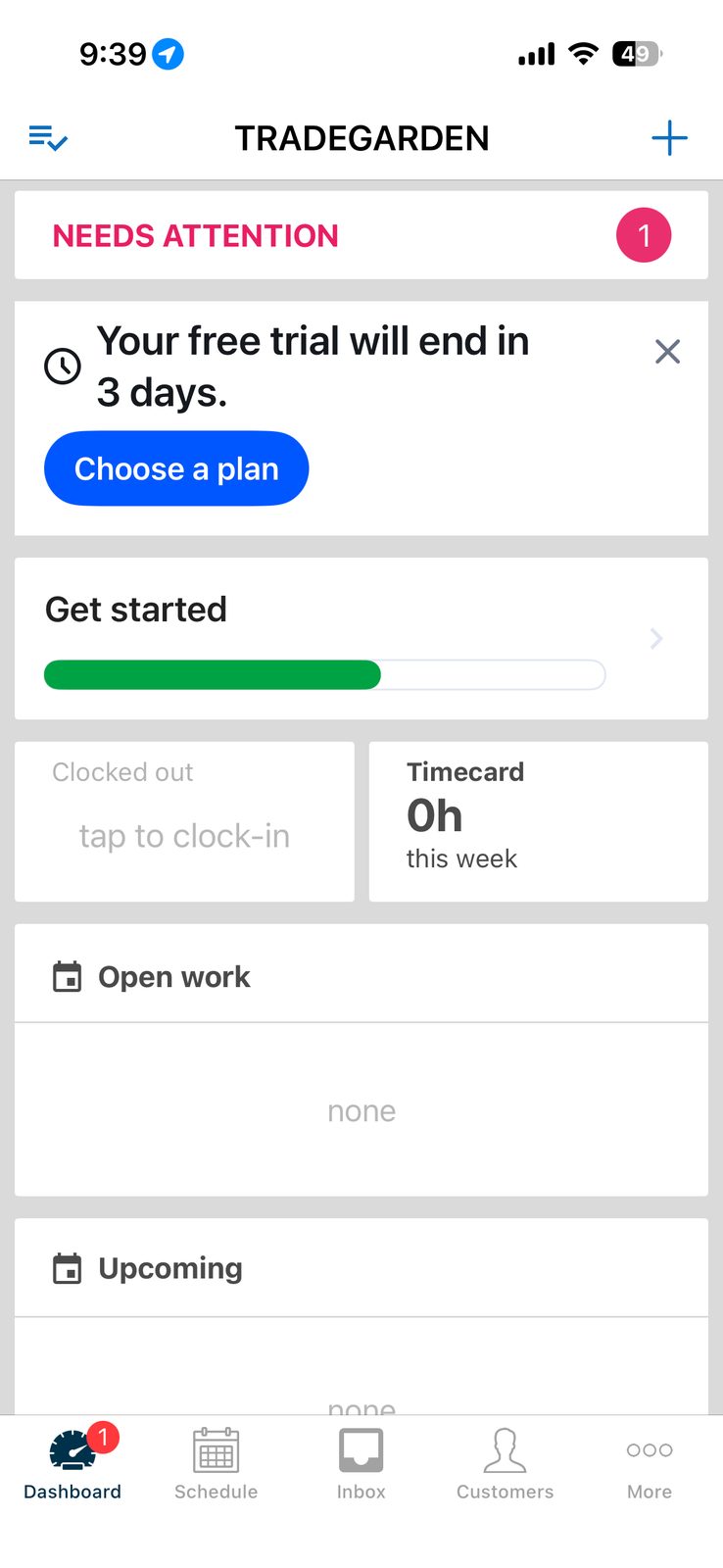
Powerful but hub-of-cards ("+") structure, more taps Inferred from docs — OMW/Start/Finish, checklists, notes, attachments Official docs say editing offline "not supported"; reviewer called…
Powerful but hub-of-cards ("+") structure, more taps
Inferred from docs — OMW/Start/Finish, checklists, notes, attachments
Official docs say editing offline "not supported"; reviewer called it "unusable" offline
Photo markup/annotation, 60-sec video w/ trim, unlimited storage, auto-retry upload
Separate add-on app; clock-notification reliability complaints
Cards/ACH/checks/financing, saved cards, mobile check deposit; one review flagged banking-verification friction
Tap job → property image via Google Maps → hand off; no confirmed day-view map
High store ratings but more reviewers mention glitches/sync delays/clock-notification bugs
Reporting & Analytics
Read more'More built-in reporting options, including detailed financial and performance reports' is a recurring theme across multiple independent comparison sources; custom dashboards for job profitability are specifically confirmed.
Reporting & Analytics
Read more'More built-in reporting options, including detailed financial and performance reports' is a recurring theme across multiple independent comparison sources; custom dashboards for job profitability are specifically confirmed.
'More built-in reporting options, including detailed financial and performance reports' is a recurring theme across multiple independent comparison sources; custom dashboards for job profitability are specifically confirmed. [Research-based: vendor docs + Capterra/G2/comparison reviews; not directly confirmed via screenshots.]
Custom dashboards are confirmed by independent comparison sources, though a fully open custom-report-builder capability wasn't independently verified beyond dashboard customization. [Research-based: vendor docs + Capterra/G2/comparison reviews; not directly confirmed via screenshots.]
'Custom dashboards to track revenue, job profitability, and business performance' is explicitly confirmed by an independent comparison source — direct evidence of KPI dashboard functionality. [Research-based: vendor docs + Capterra/G2/comparison reviews; not directly confirmed via screenshots.]
CSV import/export was directly confirmed in screenshots for the Price Book (Materials and Services tabs both have dedicated Import/Export sections). [Research-based: vendor docs + Capterra/G2/comparison reviews; not directly confirmed via screenshots.]
Manual time logging for payroll accuracy is confirmed; less automated than Jobber's GPS-triggered approach per the same independent comparison source. [Research-based: vendor docs + Capterra/G2/comparison reviews; not directly confirmed via screenshots.]
Custom dashboards for job profitability are confirmed by an independent comparison source, and Cost breakdown / Profit-Loss percentage fields were directly visible in HCP's own estimate screenshots earlier in this review. [Research-based: vendor docs + Capterra/G2/comparison reviews; not directly confirmed via screenshots.]
'Performance pay' is listed as a named feature at the Pro plan tier in a competitor's published plan breakdown, suggesting commission support exists but is gated to a higher tier; not independently confirmed beyond that reference. [Research-based: vendor docs + Capterra/G2/comparison reviews; not directly confirmed via screenshots.]
Marketing and communication
Read moreNative reputation dashboard plus direct Google Local Services Ads integration for review generation — most complete built-in tool of the three.
Marketing and communication
Read more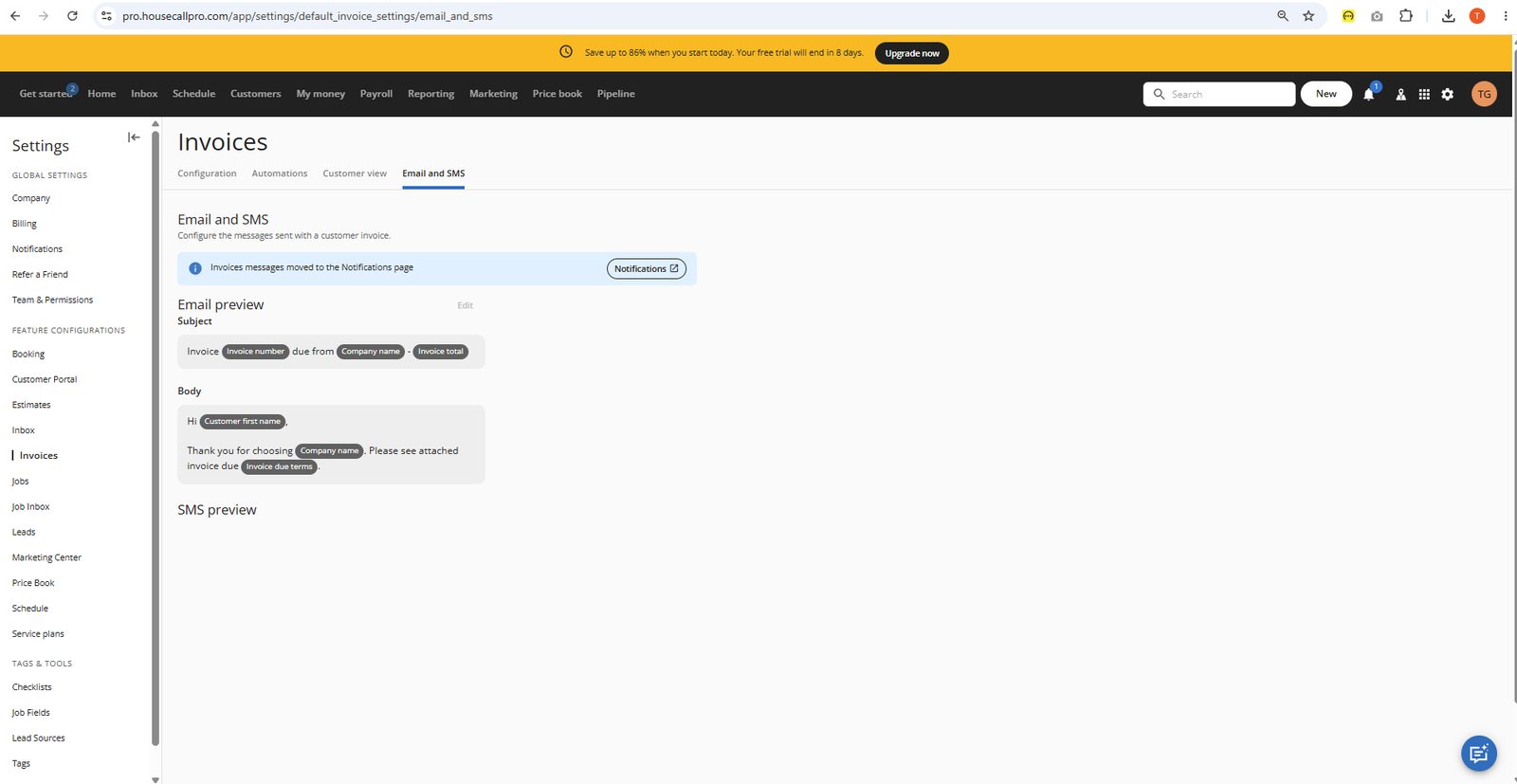
Native reputation dashboard plus direct Google Local Services Ads integration for review generation — most complete built-in tool of the three.
Native reputation dashboard plus direct Google Local Services Ads integration for review generation — most complete built-in tool of the three. [Research-based: vendor docs + Capterra/G2/comparison reviews; not directly confirmed via screenshots.]
Independent comparison specifically identifies HCP as 'the only FSM with built-in physical mail (postcard) capability' alongside native email campaigns and AI-generated marketing copy — clear standout. [Research-based: vendor docs + Capterra/G2/comparison reviews; not directly confirmed via screenshots.]
Directly confirmed in screenshots: an 'Estimate lead source' column and filter appear natively in HCP's Estimates list and filter panel. [Research-based: vendor docs + Capterra/G2/comparison reviews; not directly confirmed via screenshots.]
'Track, manage, and answer every call, 24/7' is confirmed directly in HCP's own marketing copy, indicating built-in call tracking/answering capability. [Research-based: vendor docs + Capterra/G2/comparison reviews; not directly confirmed via screenshots.]
Consistently cited across multiple independent comparison sources as the strongest of the three for hands-off automation — reminders, follow-ups, and review requests 'without lifting a finger.' [Research-based: vendor docs + Capterra/G2/comparison reviews; not directly confirmed via screenshots.]
Built-in communication tools are called out as a genuine strength; SMS receipts and text-message card-on-file requests are confirmed directly in vendor documentation. [Research-based: vendor docs + Capterra/G2/comparison reviews; not directly confirmed via screenshots.]
Native email templates plus an AI-assisted campaign copywriting tool are confirmed by independent comparison sources — the most native depth of the three. [Research-based: vendor docs + Capterra/G2/comparison reviews; not directly confirmed via screenshots.]
A native review management dashboard consolidating Google, Facebook, and other platforms is confirmed, plus direct Google Local Services Ads integration — the most complete built-in review system of the three per independent comparison. [Research-based: vendor docs + Capterra/G2/comparison reviews; not directly confirmed via screenshots.]
Integrations
Customer Support
Channels
Phone, in-app chat, help center
Hours
Not publicly listed
Avg Response
Varies by plan and issue complexity