
FieldPulse pairs a standout mobile app and US-based onboarding with solid mid-market scheduling and job costing — though reporting stays basic and demo-required pricing lags top competitors. We completed all 95 rubric tests across onboarding, CRM, scheduling, dispatch, estimates, invoicing, payments, communication, reporting, mobile use, pricing, and support. FieldPulse earned a TradeGarden score of 7.8/10.
FieldPulse
Trade Categories
Software Categories
Affiliate disclosure: Some links on this page are affiliate links. We earn a commission at no cost to you. This never influences our rankings. Read our methodology.
Quick Verdict
FieldPulse has standout mobile app and great onboarding help with a solid mid-market scheduling and job costing package. Reporting is basic, marketing tools lean on integrations, and sales-based pricing quotes lags the transparency of Jobber or Housecall Pro.
What We Like
- Job costing with estimate-vs-actual margin comparison — a strength users mention
- Standout mobile app with offline mode for rural and connectivity-challenged field crews
- Dedicated US-based onboarding specialist with recorded training sessions for future use
- Chat support typically resolves issues within minutes which is among the fastest in our comparisons
- Drag-and-drop scheduling with conflict alerts and auto-schedule features praised at this price tier
What Could Improve
- Reporting is basic — multiple independent reviews call it unsuitable for data-driven operations
- No self-serve free trial — must book a personalized demo before accessing the platform
- Custom pricing is no longer publicly listed — quote required before committing
- No native call tracking or VoIP — Engage add-on needed for full phone and SMS capabilities
- Customer records spread across too many pages — notes and photos do not follow the job workflow
How We Tested FieldPulse
We evaluated FieldPulse using the same TradeGarden rubric applied to every field service platform — 95 scored elements across scheduling, CRM, invoicing, mobile, and support, tested hands-on in live accounts rather than from marketing materials.
Each item was scored through our hands-on pass and cross-checked against an independent AI-assisted pass, with manual audits wherever the two diverged. Read our full methodology.
Last tested: August 2, 2026
Pricing
Essentials
$99/user/month
Best Value!
Professional
Contact Professional
Enterprise
Contact Enterprise
Pricing verified August 2026. FieldPulse updates pricing periodically.
Who Should Use This Software?
Great For
- Trades with 3–15 technicians wanting competitive per-seat pricing at small/medium company sizes
- Field crews working in rural areas needing reliable offline mobile access
- Shops prioritizing job costing and estimate-vs-actual margin tracking
- Teams that value US-based onboarding and fast chat support over self-serve setup
Consider Alternatives If…
- You need the cleanest UI and commercial property management → Jobber
- You want built-in marketing automation and review tools → Housecall Pro
- You're call-heavy and need a built-in phone system → Workiz
- Your budget is tight at 1–2 users → Crew Control
Not Ideal For
- Solo operators or 1–2 person shops where per-seat cost is less competitive
- Data-driven owners needing custom reports and deep KPI dashboards
- Businesses wanting built-in marketing automation and native review management
- Teams needing transparent, self-serve pricing and a no-commitment free trial
FAQs
How much does FieldPulse actually cost per month?
FieldPulse pricing starts around $99/user/month for Essentials in our comparison chart for 3–10 user teams. Professional adds job costing and QuickBooks sync at ~$149/user/month per industry reports. Enterprise is quote-based with Open API access. Public list prices are no longer published so make sure and confirm current rates during your demo.
How does FieldPulse compare to other field service software?
FieldPulse leads on offline mobile capability, job costing, and US-based support responsiveness for mid-size crews. Choose Jobber for UI polish and commercial property management. Choose Housecall Pro for built-in marketing automation and review tools. Choose Workiz if inbound phone dispatch is central to your operation.
Does FieldPulse offer a free plan or free trial?
FieldPulse does not offer a self-serve free trial. You must book a personalized demo to access FieldPulse. Some third-party review sites mention a 14-day trial, but it is not prominently offered on FieldPulse's website. Onboarding includes a dedicated US-based specialist.
Does FieldPulse integrate with QuickBooks?
Yes. QuickBooks Online two-way sync on Professional plans and above syncs invoices, customers, and payments. We also confirmed integrations with Wisetack, CompanyCam, Chirp, Trinity, Zapier, and Mailchimp during research.
What types of businesses is FieldPulse best for?
FieldPulse fits small to mid-size trades with 3–10 technicians, especially for teams needing strong mobile offline access, job costing, and responsive support. Less ideal for solo operators, data-heavy reporting needs, or shops wanting self-serve trials.
Product Details
Scheduling and dispatch
Read morePlenty of options on where to create a job, fairly easy to click into the schedule to do that as well.
Scheduling and dispatch
Read more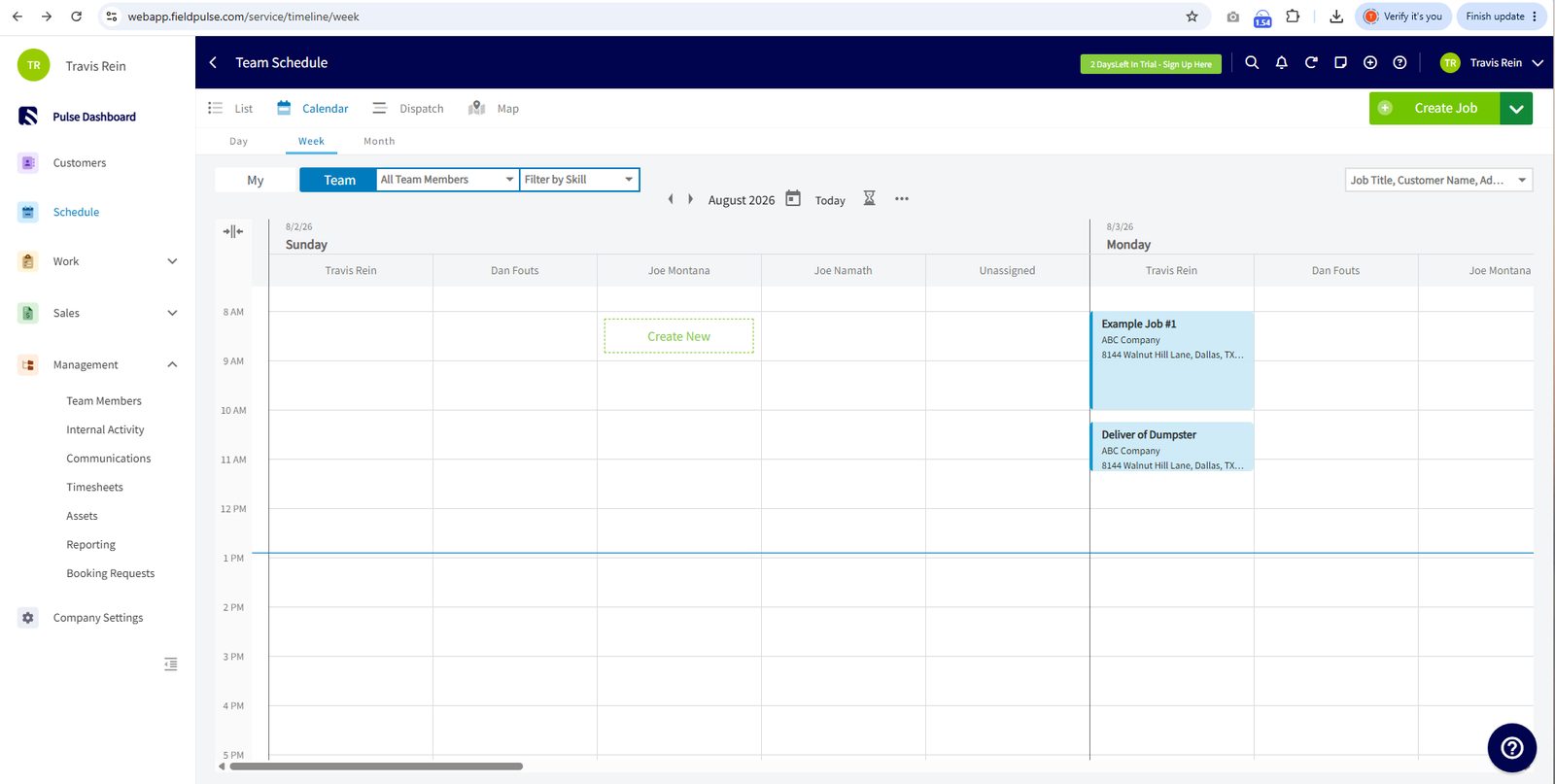
Plenty of options on where to create a job, fairly easy to click into the schedule to do that as well.
Plenty of options on where to create a job, fairly easy to click into the schedule to do that as well. Create Job form with tabs (Info, Comments, Subtasks, Estimates, Invoices, Files, Timesheets, Forms, POs). Fields: Customer link, Job Title (searchable), Assigned Users, Subtitle, Tags, Status Action Flow, Date/Time, Find Availability, Find By Map, Notes/Files, Billing. Also Import Template and recurring options.
Everything within the schedule was drag and drop, even the start and stop times. Some views limited it but in general it was available. Calendar with day view showing time blocks. Dispatch view shows team columns (Travis R., Dan F., Joe N., Joe M., Unassigned) with drag-capable job blocks. Visual drag-and-drop rescheduling across team members.
Had day, week, and month views that could be sorted by crew and by individual users. Four view modes: List, Calendar (day view with hourly blocks), Dispatch (multi-team Gantt-style), and Map (geographic job pins). Each accessible via tabs. Very complete range.
There were options for recurring jobs or maintenance plans. Seemed pretty easy to set up. Create Job shows 'Create recurring job' and 'Create recurring task' options. Recurring job scheduling directly accessible from job creation. Customer record shows Recurring Jobs and Recurring Billing tabs.
There was the option to use arrival windows and set that manually yourself as well as a default. I'm not sure how it displayed or how it worked in the SMS and email piece but it did look like all that functionality was there. Arrival Window Settings confirmed in administration. Job form includes Start/End Time fields. 'Find Availability' button for conflict checking. Standard implementation.
Assigned Users To Job' multi-select on job creation. Dispatch view shows multiple team members as swim lanes confirming multi-tech assignment. 'Modify and Assign Team' confirmed.
There were plenty of views to show tech availability and what jobs were there for each. There was plenty of filtering on the schedule. The thing that I didn't see was what it would do to prevent double booking. There was globally but at the individual tech level I couldn't find anything. Scheduling Conflicts screenshot confirms conflict detection. 'Find Availability' button on job form prevents double-booking. Team dispatch view makes availability visually clear.
Great job of using colors that can be configurable to set the status and the box shows up that way on the schedule so very nice use of color coding. There's also plenty of tagging that can change across users, across jobs, across invoices. Status Color Codes screenshot shows extensive configurable statuses. Status Action Flow configurable in settings. Calendar/dispatch views show color-differentiated blocks. More customizable than most.
Client management
Read moreFull-page Create Customer form with tabs (Info, Related Customers, Comments, Projects, Jobs, Estimates, Invoices, Files, Recurring, Purchase Orders).
Client management
Read more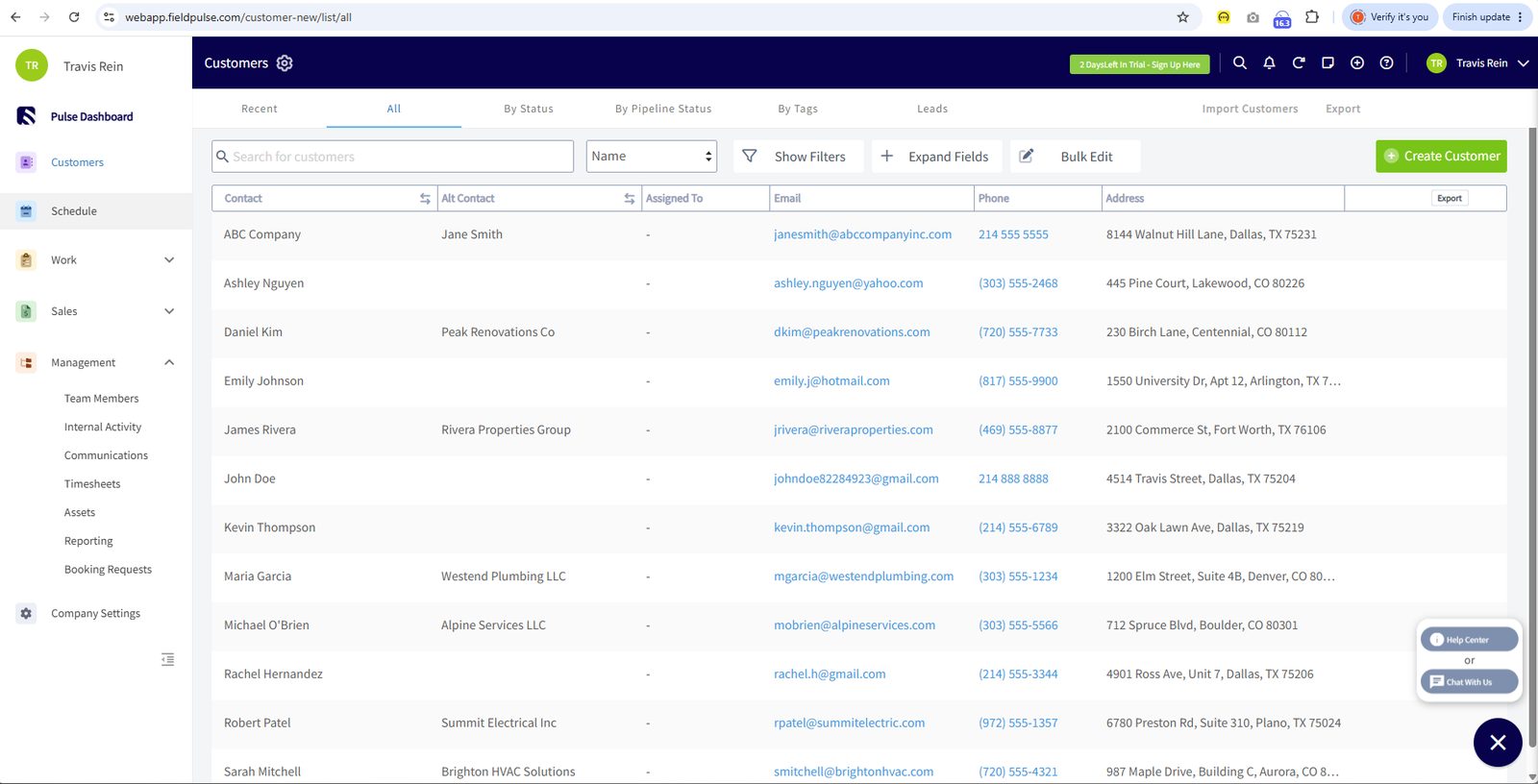
Full-page Create Customer form with tabs (Info, Related Customers, Comments, Projects, Jobs, Estimates, Invoices, Files, Recurring, Purchase Orders).
Full-page Create Customer form with tabs (Info, Related Customers, Comments, Projects, Jobs, Estimates, Invoices, Files, Recurring, Purchase Orders). Fields include Status, Account Type, Assigned To, Pipeline Status, Price Tier, Lead Source, Tax Exempt, Tags, Notes, Files. Comprehensive.
Edit customer mirrors create form with all fields editable. Same tabbed layout. Duplicate Customer Checker toggle visible. Easy to find and modify any field.
Customer record holds: company, contact info (alternate email/phone), address with billing option, account type, pipeline status, price tier, lead source, tax exempt, tags, due date defaults, notes, files. Tabs for Jobs, Estimates, Invoices, Material Lists, Recurring, POs, Assets, Maintenance Agreements. Very deep.
Additional Location' button visible on form. Separate billing address toggle. Multiple service addresses per customer with full address fields.
Customer tabs show Jobs, Estimates, Invoices, Recurring Billing, POs, Assets, Maintenance Agreements. History is tab-separated not a unified timeline. Comments tab for activity notes.
Tags field ('Add Tags') on customer form. Pipeline Status and Lead Source dropdowns for segmentation. Account Type (Residential/Commercial). Custom Fields available through administration.
Notes and Job Notes fields on customer form. Files section with drag-upload and Upload File button. Comments tab for internal notes. Coverage is good but spread across sections.
Confirmed: 'Duplicates' modal fires showing matching customer name, email, phone with 'Open Customer' action. 'Duplicate Customer Checker' toggle visible on edit form. Proactive detection.
Estimates and price book
Read moreEstimate Board shows pipeline-style view.
Estimates and price book
Read more
Estimate Board shows pipeline-style view.
Estimate Board shows pipeline-style view. Create New form includes Customer link, Title, Reference, Items, Options/Grouping, line-item management. Good layout.
By far probably the best one I've used as far as adding items, grouping, and doing options. Modify Existing screenshot shows full edit with all fields accessible. Line items editable. Options/grouping changeable. Good action menu for status/sending.
Options and Grouping confirms tiered estimate options (Estimate 1/2 tabs). Good/better/best presentations to customers. Grouping organizes line items into sections.
There is a price book but I have to jump through hoops to get it enabled. I wasn't able to check but they do have the functionality. Item List shows SKU, Name, Type, Taxed/Untaxed, Cost, Price, Quantity. Items pulled into estimates via search. 'Add Item' and 'Insert Bundle' buttons available.
All the notes claimed that this was possible to get a signature and it creates a PDF. I'm not sure how you get to that. If you have to have another plugin implemented, it was possible. | Send to Customer and Customer View confirm approval flow. Email with PDF delivery. Customer views/approves online. E-signature confirmed.
There is a single click with an estimate to convert something from an estimate to a job. Estimate-to-job conversion through Status Action Flow. Direct conversion from approved estimate to scheduled job confirmed.
On-site proposal generation via mobile. Quick estimate creation praised. 'Good quoting and invoicing' per Field Service Guide.
Multiple estimate options to customers. Sending multiple estimate options 'has been a real game-changer for close rates' per review.
Invoicing and payments
Read moreCreate Invoice: Customer link, Title, Reference, Due Date, Commission Recipient, Add Item/Grouping/Bundle/PO Items/Markup-Margin.
Invoicing and payments
Read more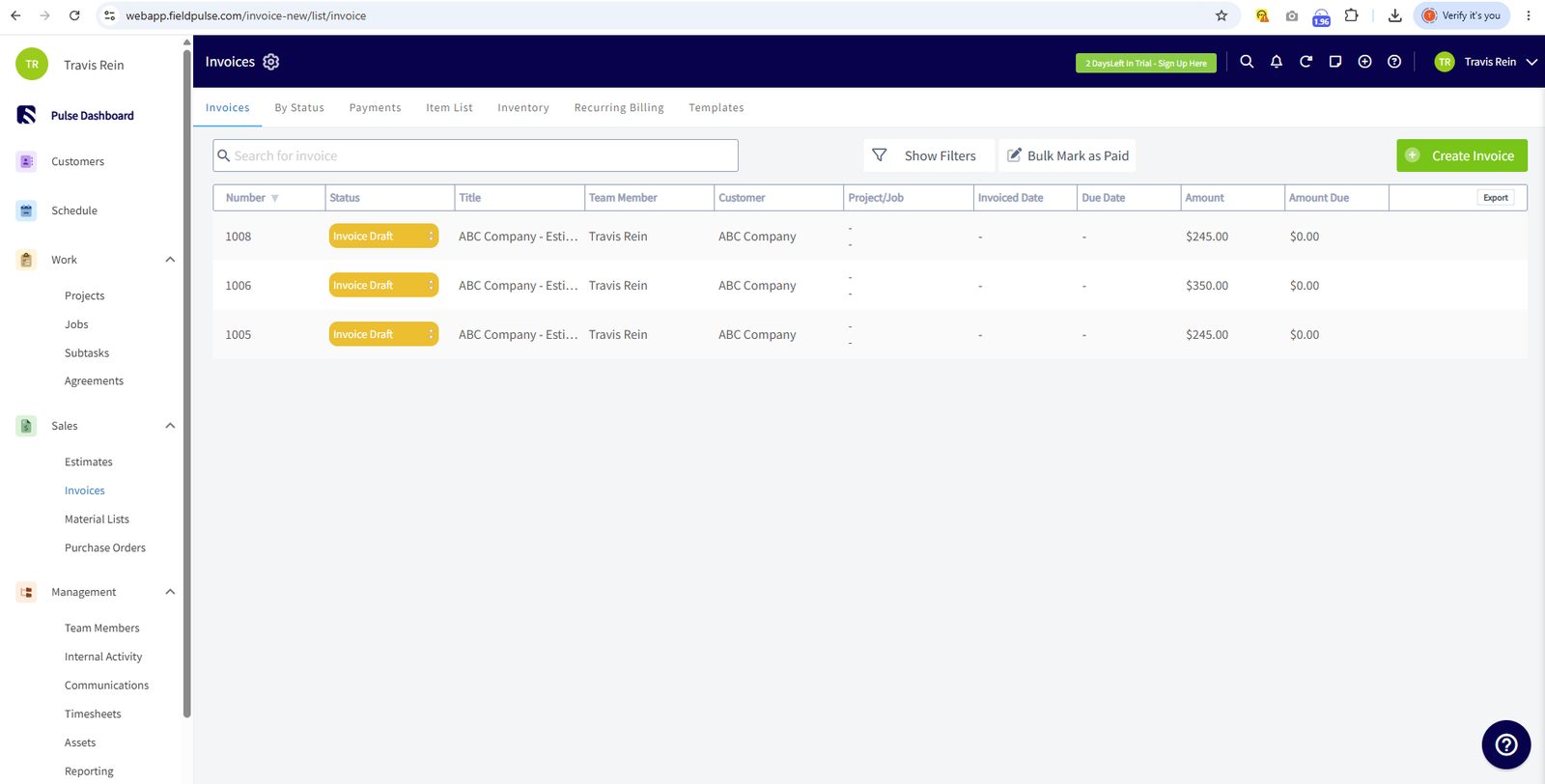
Create Invoice: Customer link, Title, Reference, Due Date, Commission Recipient, Add Item/Grouping/Bundle/PO Items/Markup-Margin.
Create Invoice: Customer link, Title, Reference, Due Date, Commission Recipient, Add Item/Grouping/Bundle/PO Items/Markup-Margin. Tags, Notes, Files, Contract, Inventory deduct, CC Fee/Surcharge/Discount. Subtotal/Tax/Total. Very comprehensive.
Invoice Edit shows full edit with all line items and details modifiable. Status workflow visible. Good action menu.
Easy to add layout, can even select what items to show right before sending. I didn't have the custoemr forms enabled so I couldn't make a true customer invoice but its possible. Invoice Themes in administration. Preview Settings. PDF Email settings. Custom Status options. General/Advanced settings. Logo for branding. Good customization depth.
Invoice Custom Status workflow screenshots show configurable status flows. Auto-invoice not directly visible as one-click feature. Status workflow supports transitions but less obvious than competitors.
Partial Payments confirmed: record partial payments against invoices. Payment tracking with running balance. Deposit and progress billing through partial payment workflow.
You can manually enter a tax rate when you're delivering the quote but there is also the functionality to have this pulled from QuickBooks and set the tax rates in QuickBooks and then be pulled into FieldPulse. I've done it the other way where it's set within the product and pushed to QuickBooks so I'm not sure which way is better. Taxes Discounts confirmed. Tax rate config in Company Settings. Taxed/Untaxed per line item. Add Discount option. 8.25% tax rate visible. Good handling.
Generate invoices on-site from mobile. Estimate-to-invoice conversion. Quick and functional for field teams.
Mobile app
Read moreMobile: full Create New from bottom nav.
Mobile app
Read more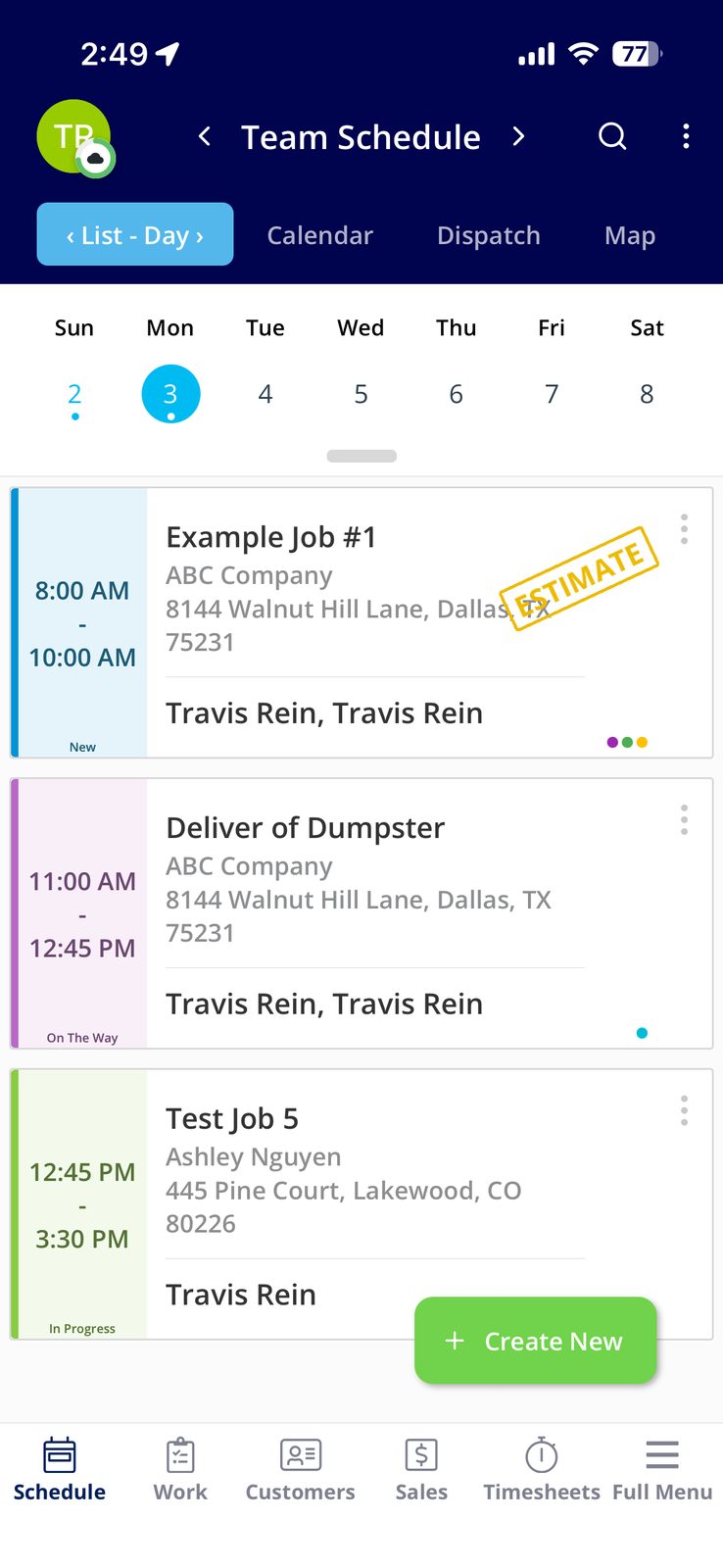
Mobile: full Create New from bottom nav.
Mobile: full Create New from bottom nav. Dashboard quick-creates (Customer, Job, Estimate, Invoice). Schedule views (List/Calendar/Dispatch/Map) all accessible. Clean mobile-first interface.
Job cards show: title, customer, address, status (New/On The Way/In Progress), assigned team, time blocks. Calendar day view with hourly breakdown. Good clarity.
Offline mode documented as a named FieldPulse feature. 'Continue operating with limited connectivity' confirmed. Available but not heavily demonstrated.
File upload throughout platform. Job form has 'Drag files to upload' and Upload File. Customer Files tab. Photos attachable to jobs, estimates, invoices.
Mobile Time Clock: Date, Time, Method (Automatic), Related Job selector, Title, Notes, Tags. 'Save Clock-In' button. Timesheets in bottom nav. Clean with GPS capability.
Mobile payments: Cash/Check/Credit Card/Bank options. $120 example payment. Records against customer. E-signature documented. Clean in-field workflow.
Mobile Map shows geographic job pins. Navigation to Google/Apple Maps via address links. Filter by Team Members and Status. Strong map-first approach.
App v2.16.2 visible. Clean native interface with consistent bottom nav. No crashes in screenshots. Generally reliable per reviews with occasional lag.
Reporting & Analytics
Read moreMultiple independent reviews (Field Service Guide, Research.com) explicitly call FieldPulse's reporting basic and "not suitable for data-driven operations." [Research-based: vendor docs + Capterra/G2/comparison reviews; not directly confirmed via screenshots.] Source: Capterra FieldPulse reviews; Field Service Guide review; FieldPulse.com job costing page & changelog.
Reporting & Analytics
Read more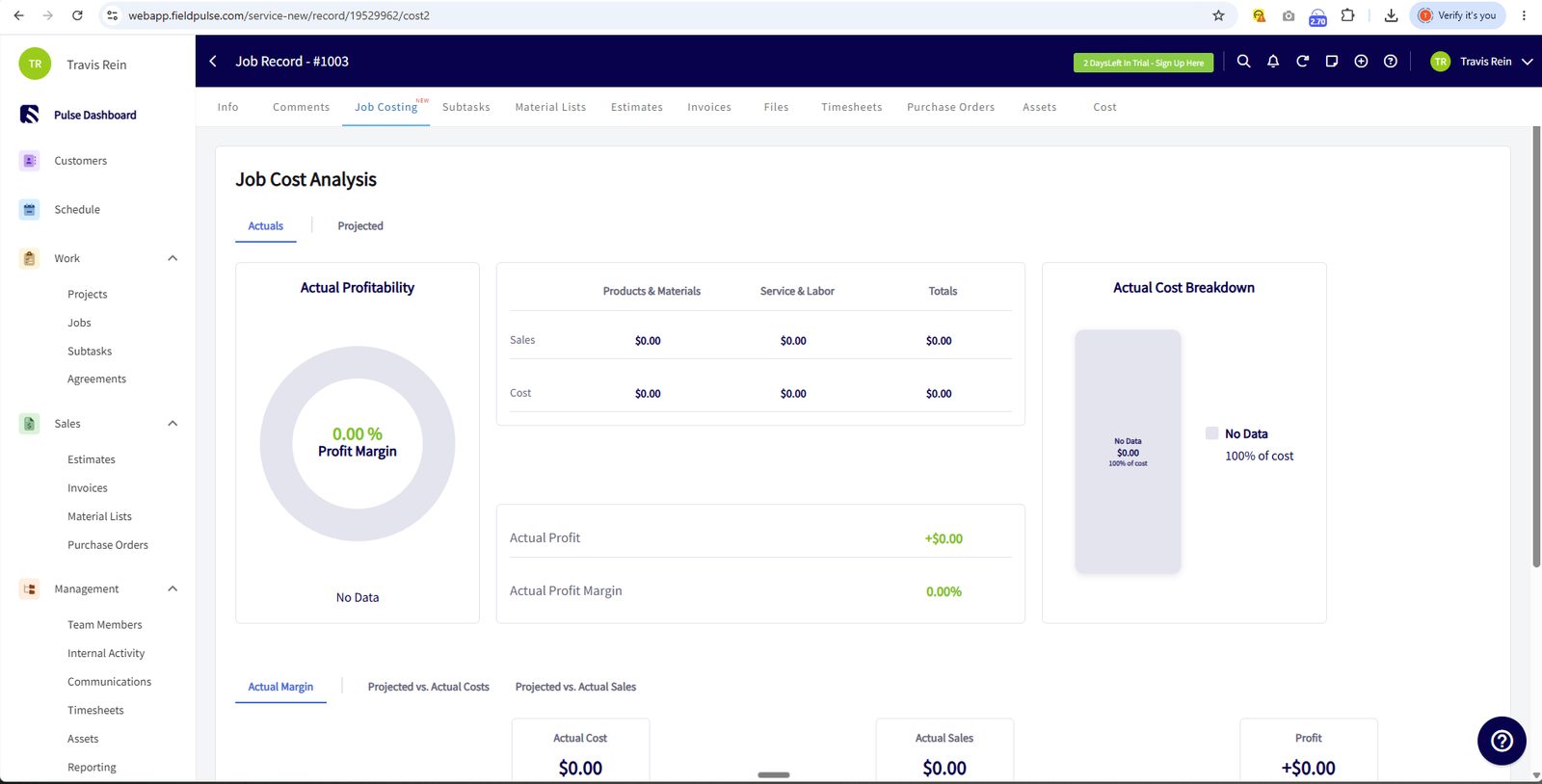
Multiple independent reviews (Field Service Guide, Research.com) explicitly call FieldPulse's reporting basic and "not suitable for data-driven operations." [Research-based: vendor docs + Capterra/G2/comparison reviews; not directly confirmed via screenshots.] Source: Capterra FieldPulse reviews; Field Service Guide review; FieldPulse.com job costing page & changelog.
Multiple independent reviews (Field Service Guide, Research.com) explicitly call FieldPulse's reporting basic and "not suitable for data-driven operations." [Research-based: vendor docs + Capterra/G2/comparison reviews; not directly confirmed via screenshots.] Source: Capterra FieldPulse reviews; Field Service Guide review; FieldPulse.com job costing page & changelog.
G2 reviewers note that building highly customized reports is time-consuming and describe reporting customization as an area for improvement. [Research-based: vendor docs + Capterra/G2/comparison reviews; not directly confirmed via screenshots.] Source: Capterra FieldPulse reviews; Field Service Guide review; FieldPulse.com job costing page & changelog.
FieldPulse markets "advanced analytics and dashboards" for revenue projection and capacity planning, though independent reviewers still want more built-in dashboard options. [Research-based: vendor docs + Capterra/G2/comparison reviews; not directly confirmed via screenshots.] Source: Capterra FieldPulse reviews; Field Service Guide review; FieldPulse.com job costing page & changelog.
Cost-basis and invoice data export (CSV) is confirmed via FieldPulse's own changelog. [Research-based: vendor docs + Capterra/G2/comparison reviews; not directly confirmed via screenshots.] Source: Capterra FieldPulse reviews; Field Service Guide review; FieldPulse.com job costing page & changelog.
Reporting available but 'basic' per multiple reviews. Limited customization for data-driven operations.
Basic workload analysis. Revenue per job, gross profit per job trackable. But deep KPIs require workarounds per reviews.
Reporting and analytics are not suitable for data-driven operations.' No meaningful custom report builder.
Pulse Dashboard with customizable widgets. Can add KPI widgets but underlying data feeds are basic.
Marketing and communication
Read moreYou can drive external review to outside websites but there isn't a review management capability.
Marketing and communication
Read moreYou can drive external review to outside websites but there isn't a review management capability.
You can drive external review to outside websites but there isn't a review management capability. It provides good functional options with the ability to both email and SMS users for reviews
Their is a portal for customers and there is a setup page for creating customer portals.
Automated appointment reminders. Engage tool (VoIP add-on) enhances communication. Basic on core platform.
Real-time customer updates on technician location and estimated arrival. GPS-based communication.
Engage VoIP available as add-on for communication. Core platform has basic messaging. Extra cost for phone features.
Basic email communication. Not a strong marketing/campaign tool compared to competitors.
Booking portals available. Customer-facing portal on higher tiers. Customer communication portals gated behind upgrades.
Reputation/review generation depends on the NiceJob integration rather than native tooling. [Research-based: vendor docs + Capterra/G2/comparison reviews; not directly confirmed via screenshots.] Source: Capterra FieldPulse reviews; Field Service Guide review; FieldPulse.com job costing page & changelog.
Integrations
Customer Support
Channels
Phone, chat, email
Hours
Not publicly listed
Avg Response
Chat typically within minutes; phone during business hours